
Trading psychology
A trader's daily routine for calm trading: before, during and after the market
A simple trading routine for intraday traders in three parts: set your limits before the open, keep a calm check during the session, and review after the close. Easy steps that keep emotions out of your day.
Quick answer: a calm trading day comes from a routine, not from willpower. Before the open, write down your limits. During the session, check yourself after every trade. After the close, spend ten minutes on what happened. Do it every day and your emotions get a lot less say in your trades.
You have a good plan at 8:30 in the morning. By 1:30 in the afternoon you are down, a bit angry, and taking trades you would never have written on that plan.
The plan was fine. The problem is that nothing held it in place once the day got loud.
This article is the daily routine. If you want the theory behind it, we wrote that already: how to control emotions in trading and how to be a disciplined trader. Here we just walk through one day, in three parts.
Part 1: Before the market opens (about ten minutes)
The goal of the morning is to make your decisions while you are calm. Once the market opens, you are not calm anymore. Nobody is.
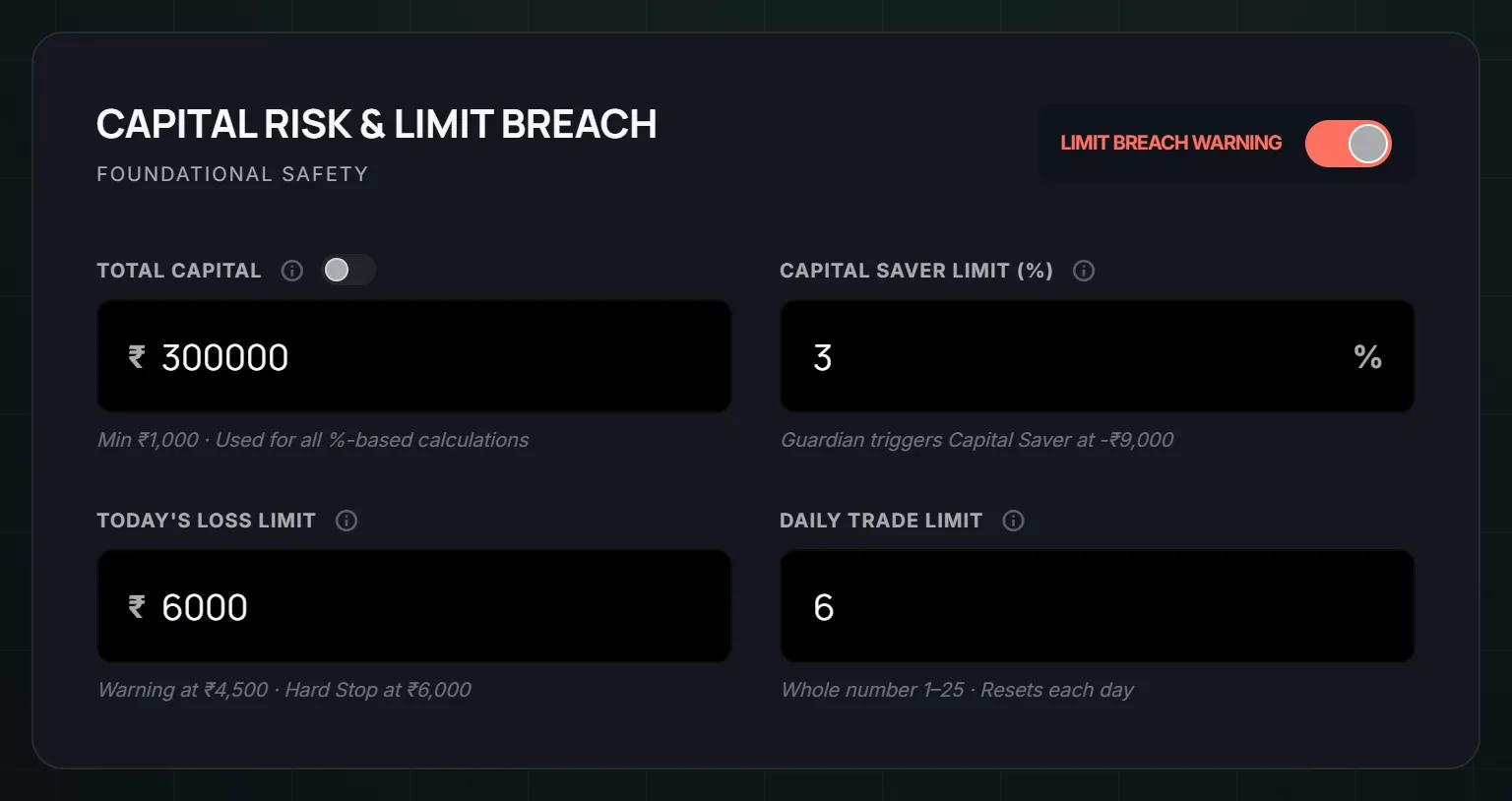
1. Write down your limits. Four numbers is enough:
- The most you will lose today.
- The most trades you will take.
- The time after which you take no new trades.
- How long you wait after a loss.
Write them on paper or in an app. They should exist outside your head. A limit that lives only in your head is easy to bend at 1:30 PM. If you are not sure what loss number to pick, how to set a daily loss limit walks through it.
2. Check your tools. Is your broker connected? Is your data coming in? You do not want to find out at 10:15 that nothing was watching.
3. Write one line about how you feel. Slept badly? Angry about something at home? Still stung by yesterday's loss? You do not need to fix it. Just know it. A tired, annoyed trader should trade smaller, or not at all, and the morning is the right time to decide that.
4. Write what a good day looks like. Do not write a profit number. Write behaviour: "I took only my setups. I stopped at my limit. I waited after losses." You control that. You do not control the market.
Where LossGuardian can hold this part
In Risk Manager you set your daily loss limit, your daily trade limit (1 to 25), your execution window end, and your impulse window (1 to 15 minutes), all before the open. During market hours some of these fields can be changed only once, on purpose, so a bad moment cannot undo a calm plan.
Then open Guardian Control and look at three things: Guardian is on, the Data Source badge shows your trades and prices are arriving, and the Risk Guard tile reads Protected. It takes about ten seconds. The guide for it is Guardian Control, and the one for limits is Risk Manager.
If you want, write a note to yourself in Advanced Mode, up to 200 characters, while you are calm. It is shown to you later if you are paused or done for the day. Something like: "A bad day is allowed. A bigger bad day is not." See Advanced Mode setup for how.
Part 2: During the session (small checks, not a big effort)
Nobody can stay perfectly calm for six hours. So do not try. The idea for the session is a few small checks that cost nothing.
1. After every trade, ask one question. "Was that in my plan?" Not "did it win?" A losing trade that followed your plan is fine. A winning trade that did not follow it is a warning.
2. After every loss, wait. Your limit for this was written in the morning. Stand up. Drink some water. Give the urge a few minutes to pass before you decide anything. If you want more on this, read how to stop revenge trading.
3. Notice the feelings that come before the bad trades. For most people it is one of four: frustration after a loss, too much confidence after a win, boredom, or fear of missing a move. When you can name it, it has less grip. "I am bored, there is no setup" is a much easier thing to deal with than a vague urge to click.
4. Keep the loss limit boring. When you reach it, you are done. Not "one more to get back". Done. You decided that when you were thinking clearly.
Where LossGuardian can hold this part
This is where an outside voice helps most, because your own voice is the one that is tired. LossGuardian warns you as you approach your daily loss limit, when you cross your trade limit, when you trade again within your impulse window, and after losses in a row. In the Alerts Designer you can rewrite those messages in your own words, so the warning sounds like you on a calm morning and not like a stranger.
With your consent, and only if you choose to turn it on, Automatic Kill Switch presses your broker's own Kill Switch for you when you are done for the day. That is the broker's switch, and it is optional. LossGuardian itself stays read-only. It never places, changes or cancels an order and never closes a position. You are always free to exit a trade. See how trading alerts help you catch mistakes for more on how the alerts work.
If Advanced Mode pauses you or ends your day, the Paused and Done screen shows you your plan against where you are now, your trades in order, and the note you wrote. Use that time as a short review, not as a countdown to your next entry. The Paused and Done screen guide explains each part.
Part 3: After the close (ten minutes)
This is the part that is easy to skip, and it is the part that changes things over time. The market has closed, there is nothing at stake, and you can look at your day without the heat.
1. Close the screen first. Take five minutes. Walk around. Do not review a day while you are still annoyed about it.
2. Look at the day in order. Not just the profit and loss. Look at when you traded, how many trades, and when the day started to go wrong. Look for a pattern, such as the slide starting at the same time on different days. Seeing it is half the fix.
3. Ask three plain questions.
- Did I keep my limits?
- Which trade was not in my plan?
- What was I feeling right before it?
4. Pick one thing for tomorrow. Just one. Not a list. For example: "Wait ten minutes after every loss." One small change is easy to keep. Five changes are forgotten by Wednesday.
5. Do a longer look once a week. Ten minutes on the weekend. Which rule did you break most often? Which day was worst? Then change one rule for next week.
Where LossGuardian can hold this part
The Trade Log keeps your journal for you, from your broker, so there is nothing to type. You see your discipline score (out of 100, and it measures how well you kept your own rules, not your profit), each trade, the alerts you got, and your estimated charges. Past performance shows you a week or a month, with the alert mix, so you can see which rule you break most.
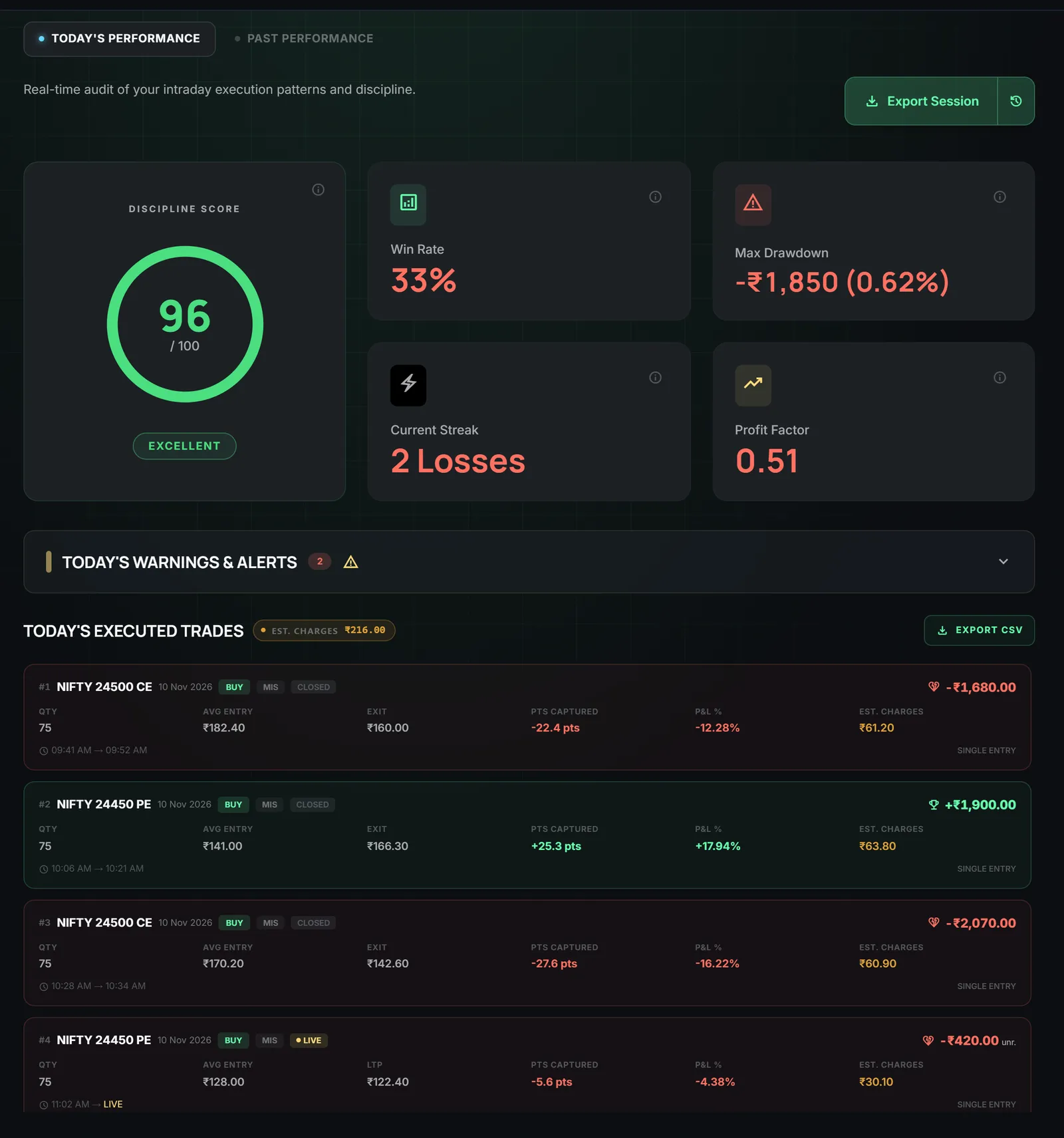
The guide has a simple weekly ten-minute review in Trade Log and Analytics, and the article your trading data knows your mistakes shows what to look for.
What the routine gives you
You do not get a perfect trader. You get a day with fewer surprises.
The morning stops being a guess. The session has a few simple checks. The evening turns a messy day into one small lesson. Over a few weeks you start to see your own patterns, and you start to follow your own rules without being reminded.
That is the point. The routine works first because something holds it for you. Over time, a lot of it moves into your own habits. A trader who needs the reminders a bit less each month is doing it right.
Start smaller than you think. Tomorrow, just write your loss limit and your trade limit before 9:15. That is all. Add the rest next week.
LossGuardian is a read-only app. It never places or closes trades. This article is for education and is not investment advice.
Questions traders ask
What is a good trading routine for intraday traders?
Keep it to three parts. Before the open, write your limits and check your tools. During the session, follow the limits and notice how you feel after each trade. After the close, spend ten minutes looking at what happened. The routine is short on purpose, so you can keep it up on bad days too.
How do I manage my emotions while trading?
Do not try to win an argument with a feeling in the middle of a trade. Decide your limits earlier, when you are calm, and let something outside your head remind you of them. Stepping away from the screen after a loss also helps.
How long should a pre-market routine take?
About ten minutes. Check that your tools are running, look at your limits, and write down what a good day looks like. A routine you skip because it takes too long does not help.
Does LossGuardian place or close trades for me?
No. LossGuardian is read-only. It never places, changes or cancels an order and never closes a position. It holds your limits, warns you, and shows you your day afterwards.
What if I break my routine one day?
It happens. Do not drop the routine because of one bad day. Start again the next morning, and look at what pulled you off it when you do your after-close review.
Can an app help me keep a daily trading routine?
LossGuardian supports each part of it: limits set before the open, alerts during the session when you slip, and an automatic journal for the evening review. It is read-only and never places an order.
LossGuardian watches your positions across six Indian brokers and warns you the moment you cross your own daily loss limit. It is read-only: it never places, modifies or cancels an order.
Download LossGuardian