
Risk strategy
Which day is best to trade? Find your no-trade day from your own data
Which weekday is best for you to trade, and which one should be a no-trade day? See your own Monday to Friday results, then trade normally, trade smaller or pause that day.
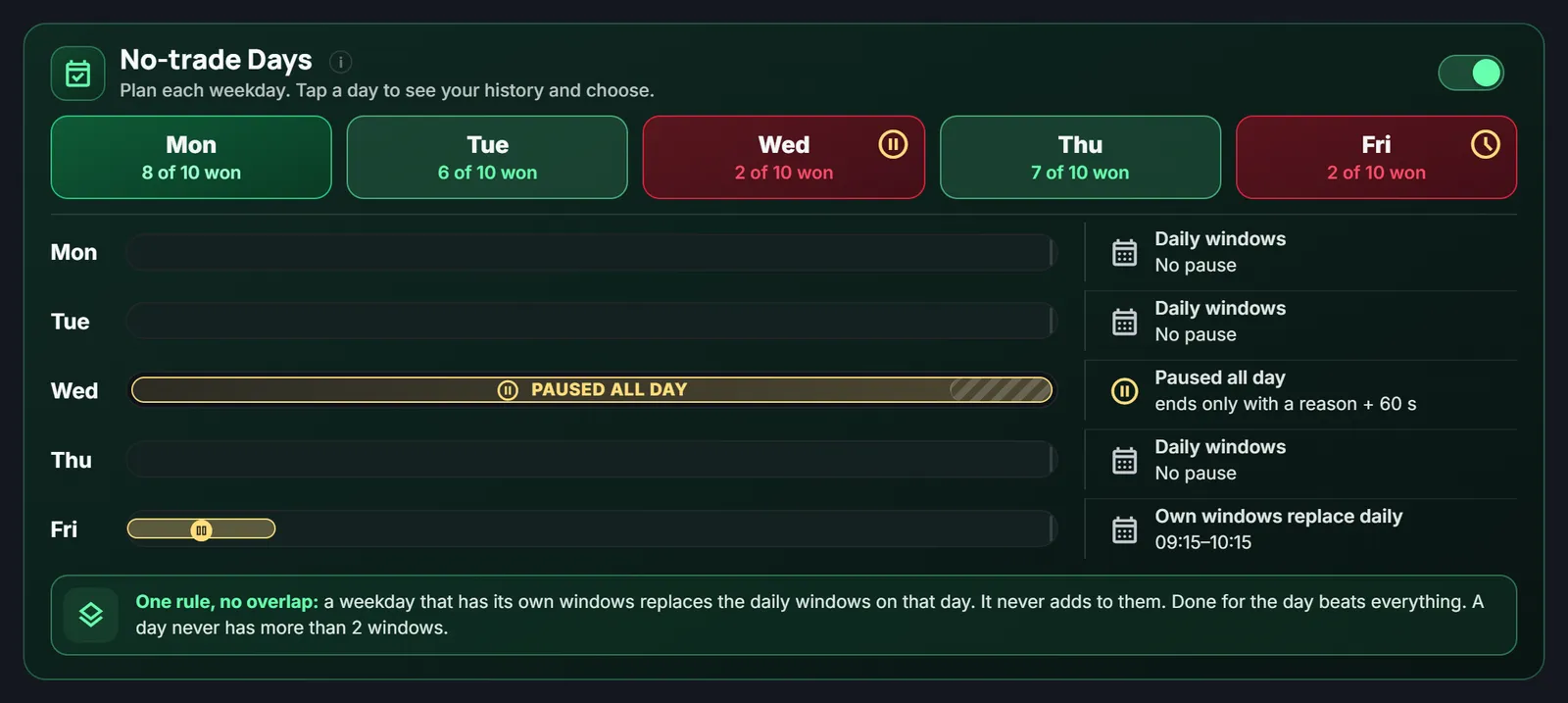
Quick answer: There is no best day to trade that works for everyone. The right way to find yours is to look at your own results, weekday by weekday. LossGuardian's No-trade Days card does that for you, and lets you trade normally, trade smaller, pause some hours, or skip a day.
You may have heard that Mondays are slow or that Fridays are wild. Maybe. But what matters is how you trade on those days.
Some traders lose money on Wednesdays and never notice. The losses are spread over weeks, so each one looks like bad luck.
Why "which day" is a data question
A single bad Wednesday means little. Ten bad Wednesdays out of ten means something.
The trouble is that nobody sits down and sorts months of trades by weekday. So the pattern stays hidden, and you keep trading the day that keeps costing you.
Your five weekdays at a glance
In the Risk Manager, the No-trade Days card shows five tiles, Monday to Friday. Each tile shows how many of your last 10 sessions on that day were winning days. The colour tells you the story: green for days that have gone well, amber for mixed days, red for hard ones.
A day needs at least 3 sessions on record before the colour means anything. Until then it says "Not enough data".
Tap a day to see the exact data
Tap any day, and you get that weekday's full history.
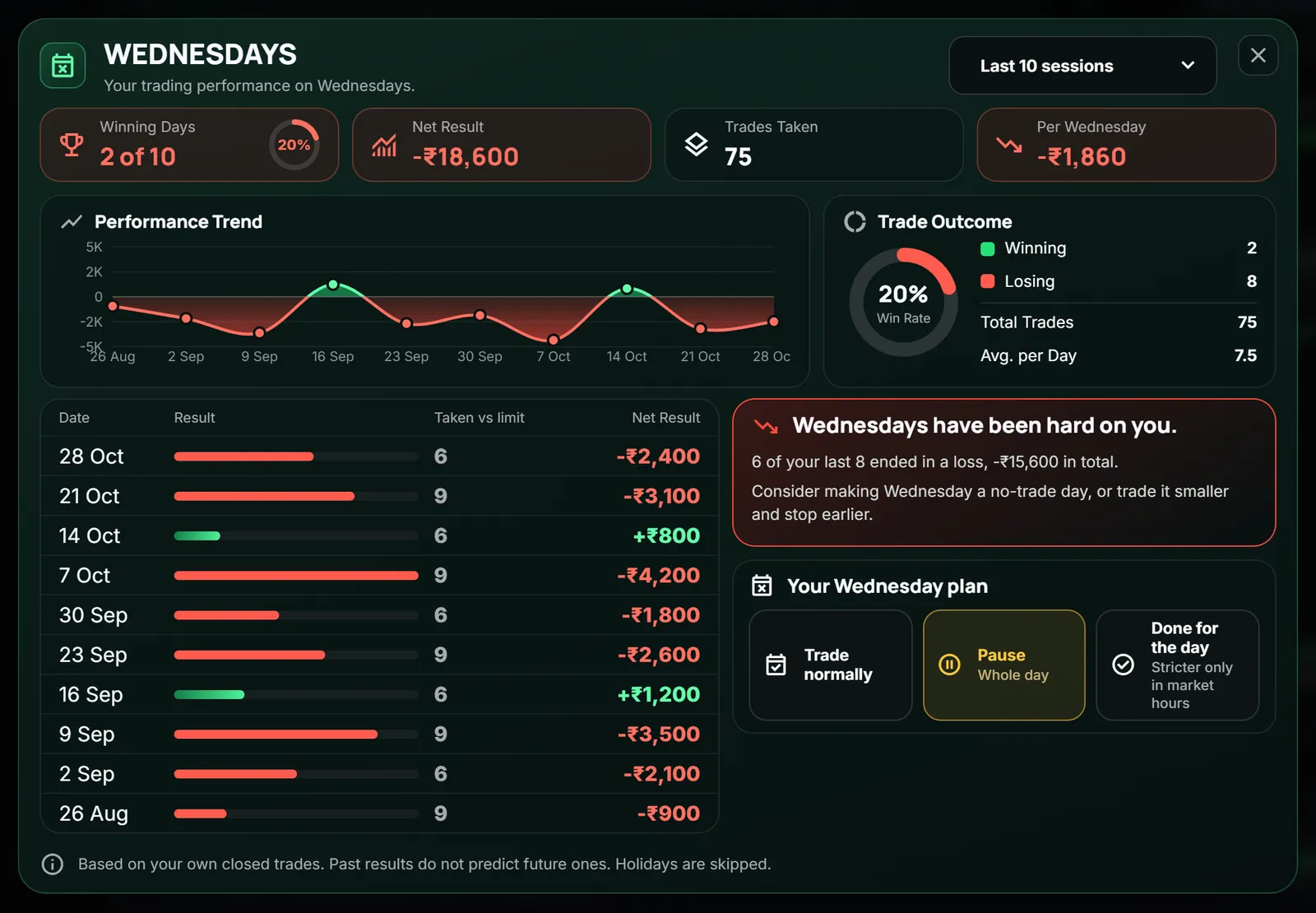
You see:
- Winning days out of your last 10, with the win rate.
- Net result and the result per day of that weekday.
- Trades taken, so you can see if you overtrade on it.
- A trend line and a list of every session, each with its result.
- A plain note, like "Wednesdays have been hard on you. Consider making Wednesday a no-trade day, or trade it smaller and stop earlier."
Tap a session to open that full day in your past performance, with every trade.
And a good day looks like this
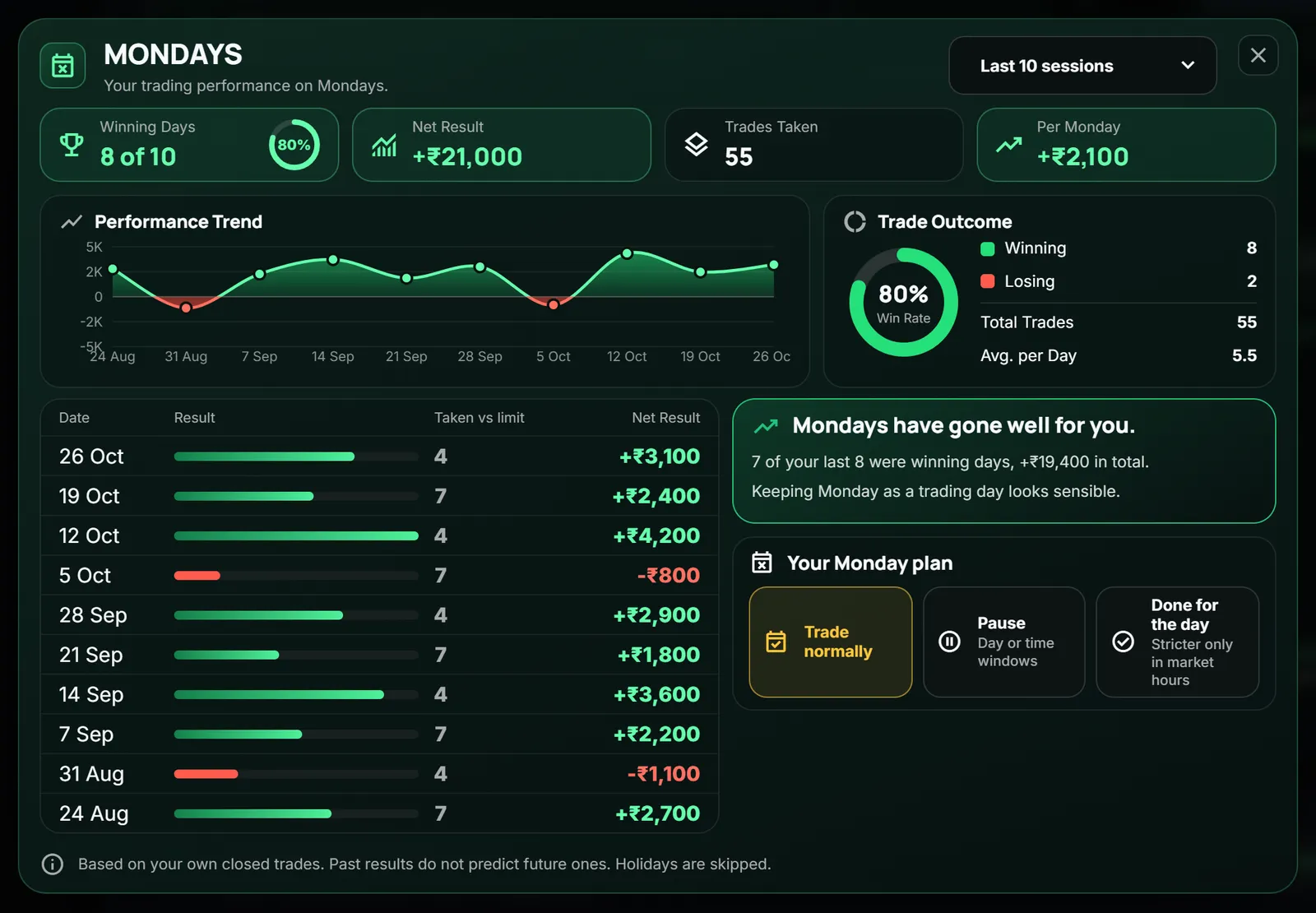
The data is not there only to scare you. It also shows where you are strong, so you can trade those days with more confidence in your own method.
What you can do with a weak day
For every weekday, you choose a plan.
- Trade normally.
- Your own pause windows. For example, pause the first hour. A day can have up to 2 windows.
- Pause the whole day.
- Done for the day. New orders stop for the whole day.
A weekday with its own windows replaces your daily windows on that day. It never adds to them. Done for the day beats everything.
Which one is right? That depends on the day.
- A day that is mostly red: consider a no-trade day.
- A day that is mixed: trade smaller, stop earlier, or pause the hours you usually go wrong.
- A day with little data: wait for more sessions.
You can change a plan outside market hours and it applies at once. During market hours your plan holds, so a bad moment cannot undo a good decision.
What it does not do
It does not say what will happen next Wednesday. Past results do not predict future ones, and the card says so.
It also does not decide for you. You pick the plan. LossGuardian only shows the data and keeps your decision in place when the day comes.
Where to go next
- How the past numbers look in full: trading performance analysis, how to review your past trades.
- The habit behind bad days: how to stop overtrading.
You can try LossGuardian free for 10 days, no card needed. Download it here.
Questions traders ask
Which day is best to trade in the week?
There is no best day for everyone. The best day for you is the one where your own results are good. Check your last ten Mondays, Tuesdays and so on, and see which days you win and which days cost you money.
What is a no-trade day?
A day you decide, in advance, not to trade, or to trade less. You choose it from your own data, not from a feeling on the day.
How does LossGuardian help me pick a no-trade day?
LossGuardian's No-trade Days card shows each weekday's last 10 sessions: how many you won, your net result and the trades you took. If a day has been hard on you, it suggests a no-trade day, or trading it smaller and stopping earlier. The choice stays yours.
Can I pause only some hours of a day?
Yes. For each weekday you can set your own pause windows, pause the whole day, or choose Done for the day. A weekday with its own windows replaces the daily windows on that day.
Do past results predict the future?
No. The data describes how you traded, not what will happen next. It is a reason to look closely at a day, not a promise.
LossGuardian watches your positions across six Indian brokers and warns you the moment you cross your own daily loss limit. It is read-only: it never places, modifies or cancels an order.
Download LossGuardian