
Trading psychology
How to stop giving back profits in trading: Profit Lock and booking reminders
Up in the morning, flat by 3 PM? How to protect a winning day with a profit target, a pause after each trade, and a reminder to book profit. Profit Lock in LossGuardian.
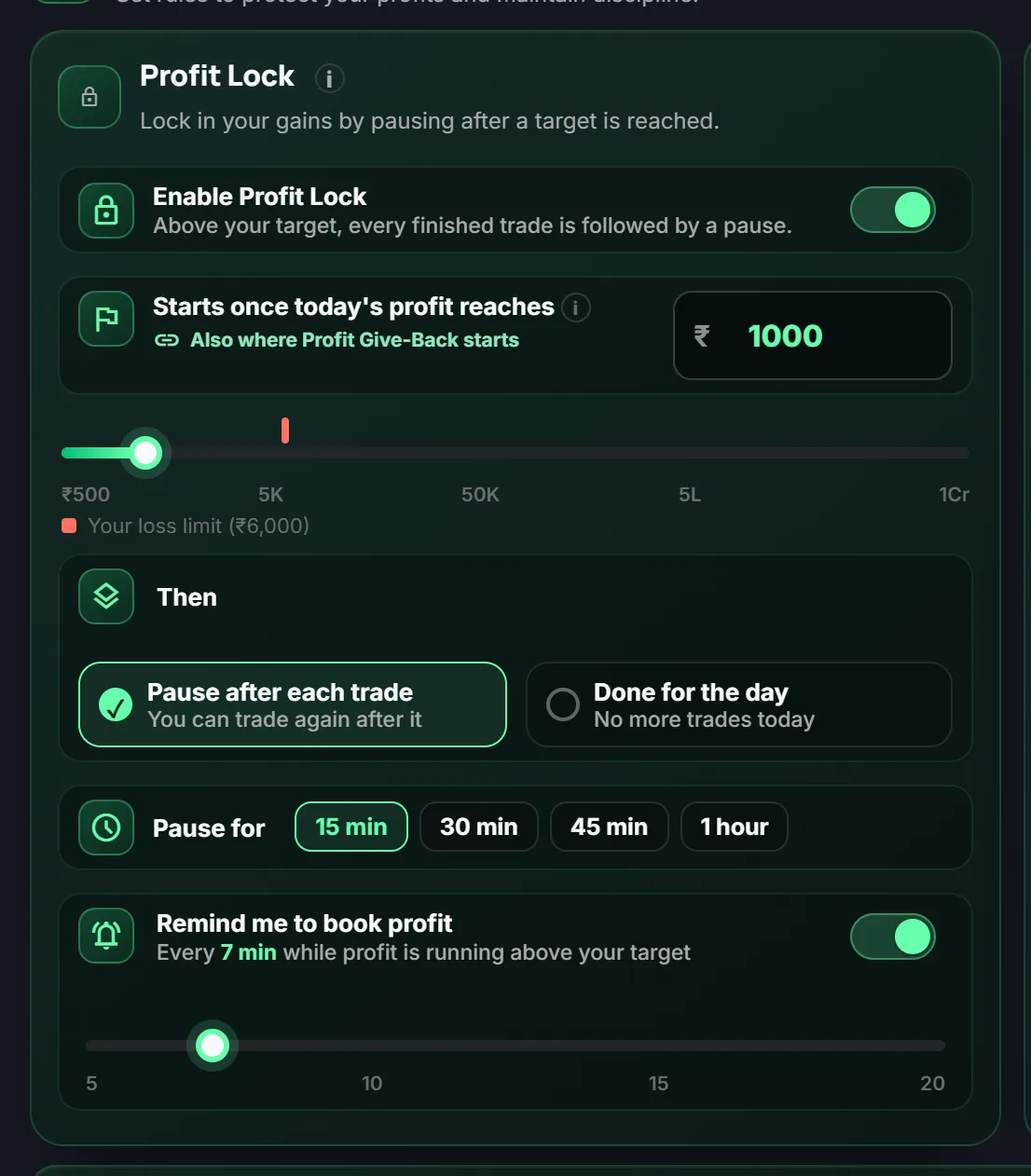
Quick answer: To stop giving back profits, set a profit target before the market opens and agree in advance what happens when you reach it. LossGuardian's Profit Lock does that: once your booked profit reaches the target, every finished trade is followed by a pause, or the day is done.
It is 11 AM and you are up ₹6,000. By 3 PM you are flat.
You did not lose it on one trade. You lost it on the trades you did not need to take. Read more about this feeling in why do I keep trading after winning.
Why profit is hard to protect
A loss limit protects you when you are down. Nothing protects you when you are up.
After a good run you feel sharp. Standards drop, size goes up, and the target quietly moves from "follow my plan" to "make one more round number". A rule made earlier, when you were calm, is the cure.
How Profit Lock works
You set a start amount, for example ₹5,000. Until your booked profit reaches it, Profit Lock waits.
After that you choose what happens.
- Pause after each trade. Each finished trade is followed by a pause of 15, 30, 45 or 60 minutes. You can trade again after it, and add to your profit.
- Done for the day. No more trades today.
It acts on booked profit, meaning closed trades, not on profit that is still open.
Booking reminders
Sometimes you do not need a pause. You need a nudge.
Turn on Remind me to book profit. While your profit is running above your target, LossGuardian reminds you to consider booking some of it, every few minutes at the interval you pick, from 5 to 20.
It is a soft reminder. It stops nothing and changes no rule. The decision is yours.
Profit Lock and Profit Give-Back
They work well together.
- Profit Lock slows you down after you reach the target.
- Profit Give-Back watches your best profit of the day. If you give back more than you allow, it steps in.
Both start from the same amount, so you set one number. See the Risk Manager guide.
A simple way to set it
- Pick a target that is realistic for you, not your best day ever.
- Start with Pause after each trade, 15 or 30 minutes.
- Turn on the booking reminder.
- After a few weeks, look at your data and adjust.
Your own past days will show you what a good target looks like. Read how to review your past trades.
What it cannot do
It cannot make you profitable, and it promises no result. It helps you follow a rule you wrote when you were calm.
Profit Lock is part of Advanced Mode, which is optional.
Where to go next
- The mindset: why do I keep trading after winning.
- The wider habit: how to be a disciplined trader.
- Protect your capital: how to protect your trading capital.
You can try LossGuardian free for 10 days, no card needed. Download it here.
Questions traders ask
How do I stop giving back profits in trading?
Decide your profit target before the market opens. Once your booked profit reaches it, slow down: pause after each trade, or stop for the day. Do not leave that decision to the moment.
What is Profit Lock in LossGuardian?
A rule you turn on in Advanced Mode. Once your booked profit reaches the target you set, every finished trade is followed by a pause, or you are Done for the day. It acts on closed trades, not on open P&L.
Does Profit Lock stop me from making more money?
With the pause option, you can trade again after each pause, so you can still add to your profit. It only slows you down at the moment you are most likely to over-trade.
Does LossGuardian remind me to book profit?
Yes. In LossGuardian you can turn on a booking reminder. While profit is running above your target, it reminds you to consider booking some of it, at the interval you pick. It stops nothing and changes no rule.
Is Profit Lock the same as Profit Give-Back?
No. Profit Give-Back watches your best profit of the day and acts if you give back more than you allow. Profit Lock slows you down after your target. They share the same start amount and can work together.
LossGuardian watches your positions across six Indian brokers and warns you the moment you cross your own daily loss limit. It is read-only: it never places, modifies or cancels an order.
Download LossGuardian