
Trading psychology
7 rules to stop revenge trading (and how to automate each one)
Seven simple rules to stop revenge trading and emotional trading. Each rule says what to do and how LossGuardian can hold it for you when you cannot.
Quick answer: To stop revenge trading, write seven rules while you are calm: a daily loss limit, a wait after every loss, a stop after losses in a row, a cap on trades, a cut-off time, a warning in your own words, and a stop that is real. The hard part is keeping them at 11:40 after a loss. That is where LossGuardian helps.
The pain
You take a loss. Then you take another trade in a hurry, just to get the money back.
You knew the rules. You had them in your head that morning. At the moment you needed them, they were gone.
This is normal. After a loss, the part of your brain that knows the rules goes quiet. The part that wants to fix things right now takes over. We wrote about why in why do I feel compelled to trade after a loss.
So here is the idea behind this whole article. A rule you only keep when you are calm is a rule something else can hold for you. Below are seven rules. For each one: what to do, why it works, and how LossGuardian can help.
If you want the full story of what revenge trading is, start with how to stop revenge trading. This article is the rulebook.
Rule 1: Decide your daily loss limit before the market opens
The rule: One number. The most you will lose today. Set it from your capital, not your mood.
Why it works: Revenge trading turns a small bad day into a big one. A limit puts a floor under the day. If you do not have one yet, read how to set a daily loss limit and try the free loss limit calculator.
How LossGuardian helps: In Risk Manager you set your daily loss limit in rupees. You get a warning on the way and a hard stop when you reach it. There is also Capital Saver, a higher limit above it that protects the account itself. When Capital Saver breaks, the day is over with no reset.
Some of these fields can be changed only once a day. That is on purpose. A bad moment cannot undo a plan you made calmly. The full list is in the Risk Manager guide.
Rule 2: Wait after every loss
The rule: After a losing trade, no new entry for a set number of minutes. Pick your number and write it down.
Why it works: The urge to revenge trade is strongest right after the loss. A short wait gives it time to pass, and you get to look at the trade with a clearer head.
How LossGuardian helps: You set an impulsive trade window from 1 to 15 minutes. If you trade again inside it, the trade is flagged as an impulse trade. The Impulsive Trade alert then starts a cooldown countdown in the top right of your screen. You can set that cooldown from 5 to 60 minutes in Alerts Designer.
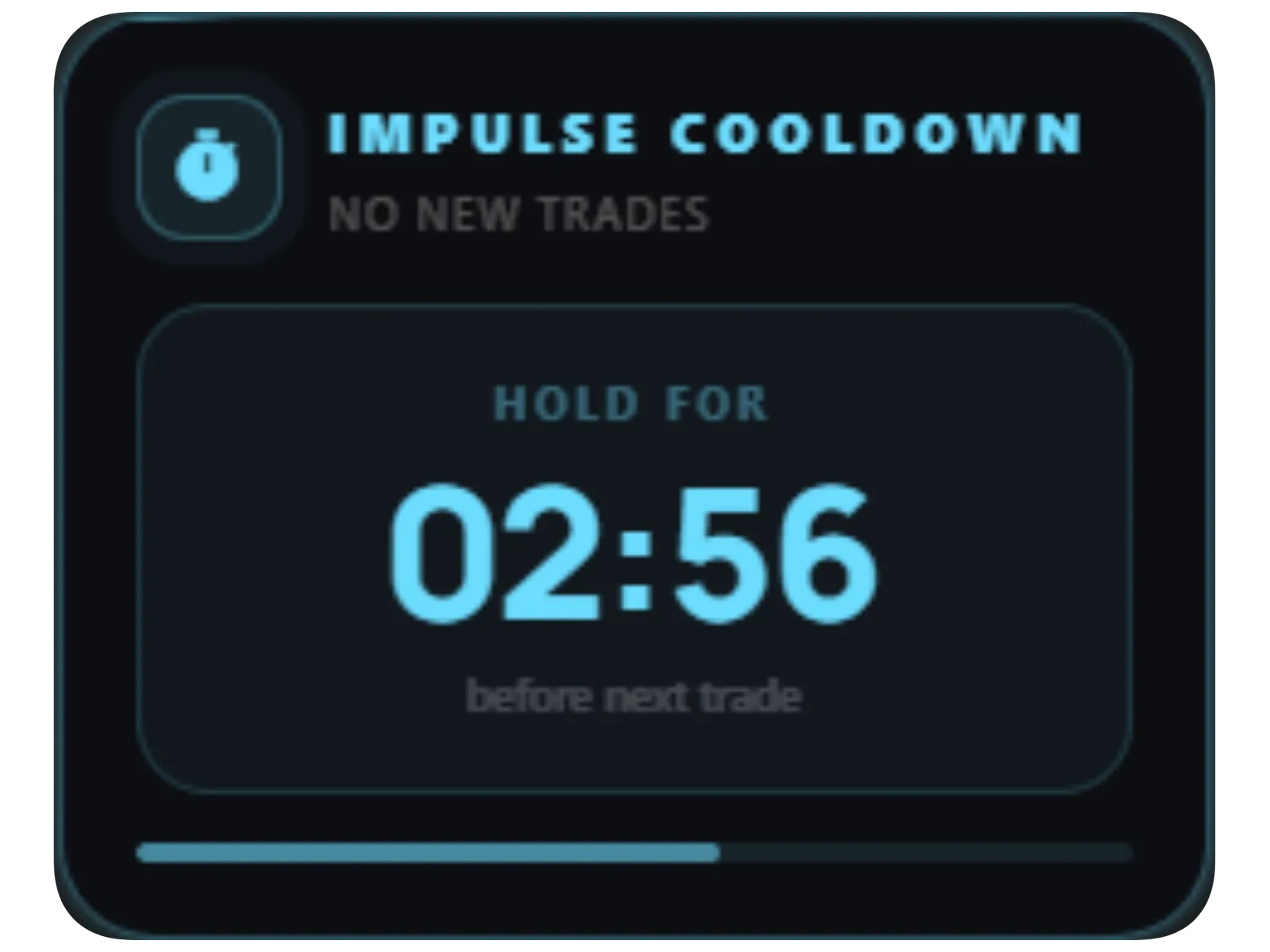
It does not matter if the revenge trade wins. A winning revenge trade is the worst kind, because it teaches you the habit works.
Rule 3: Stop after losses in a row
The rule: Pick a number of losses in a row. When you hit it, you step away.
Why it works: A streak of losses is information. Either your read on the market is off today, or your head is. More trades do not fix either one.
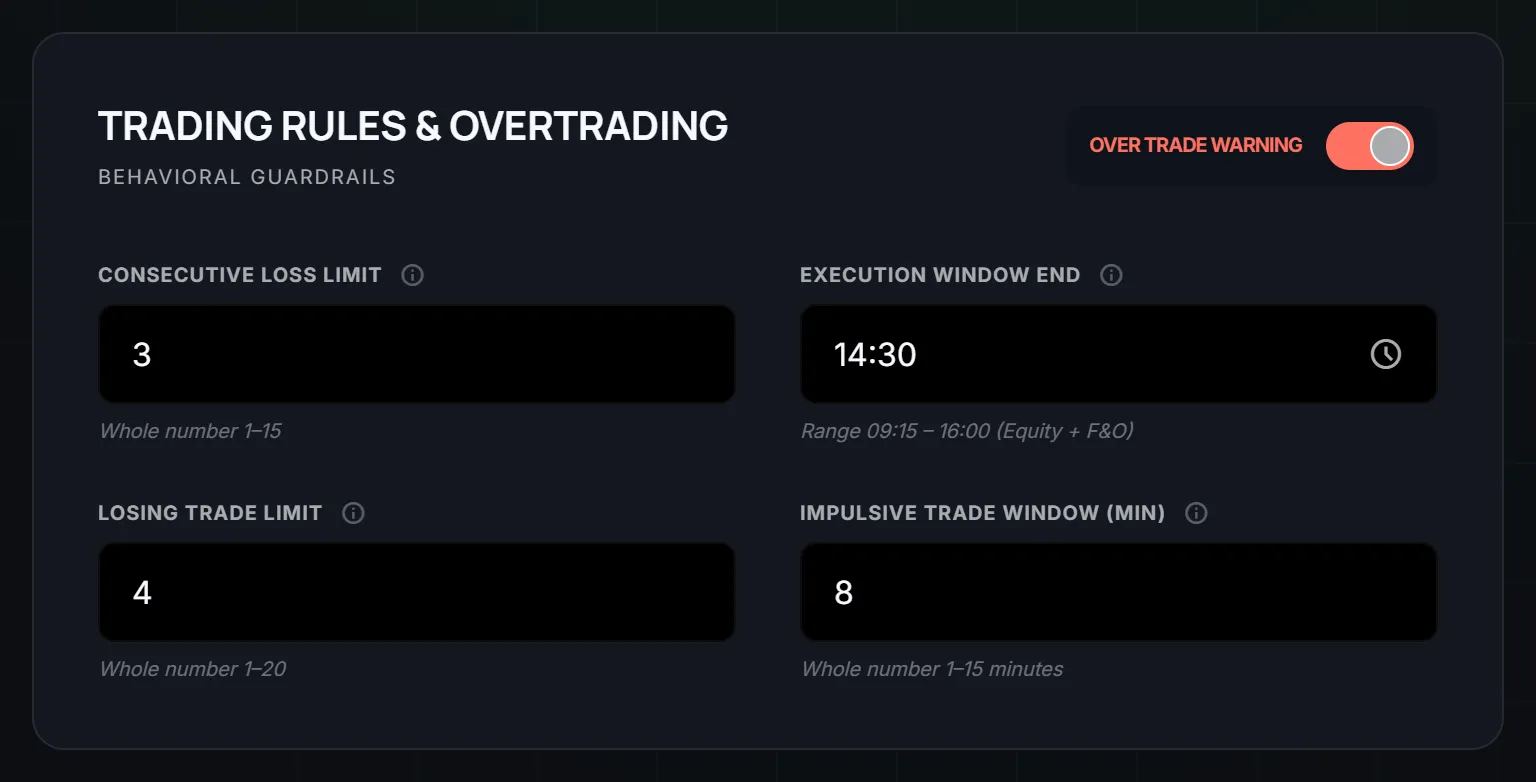
How LossGuardian helps: Risk Manager has a consecutive loss limit, from 1 to 15. It warns you when you reach it. It also has a losing trade limit, from 1 to 20, for the most losing trades you allow in a day.
We cover the pattern in consecutive losses in trading.
Rule 4: Cap your trades for the day
The rule: Decide how many trades you will take today. When you reach the number, you are done.
Why it works: Revenge trading shows up as extra trades. A cap makes the count visible before you are deep in it. If this sounds like your day, signs of overtrading will help you see it.
How LossGuardian helps: The daily trade limit in Risk Manager takes a number from 1 to 25. The Over Trade Warning switch in Risk Manager also spots impulsive patterns, like going straight back into a contract after you exit it. Your trade-limit warnings keep working either way.
Rule 5: Set a cut-off time
The rule: Pick a time after which you take no new trades. For many traders the afternoon is where discipline breaks, as we explain in why discipline fails at 1:30 PM.
Why it works: Tired traders make worse calls. A cut-off turns "should I keep going?" into a question you answered this morning.
How LossGuardian helps: The execution window end in Risk Manager is your cut-off, for example 14:30. You set it once a day, before you need it.
Rule 6: Write your own warning, while you are calm
The rule: Write a short message to yourself. Say what you would say to a friend who just lost money and is about to do something silly.
Why it works: A generic warning is easy to ignore. Your own words are harder to ignore. You wrote them for exactly this moment.
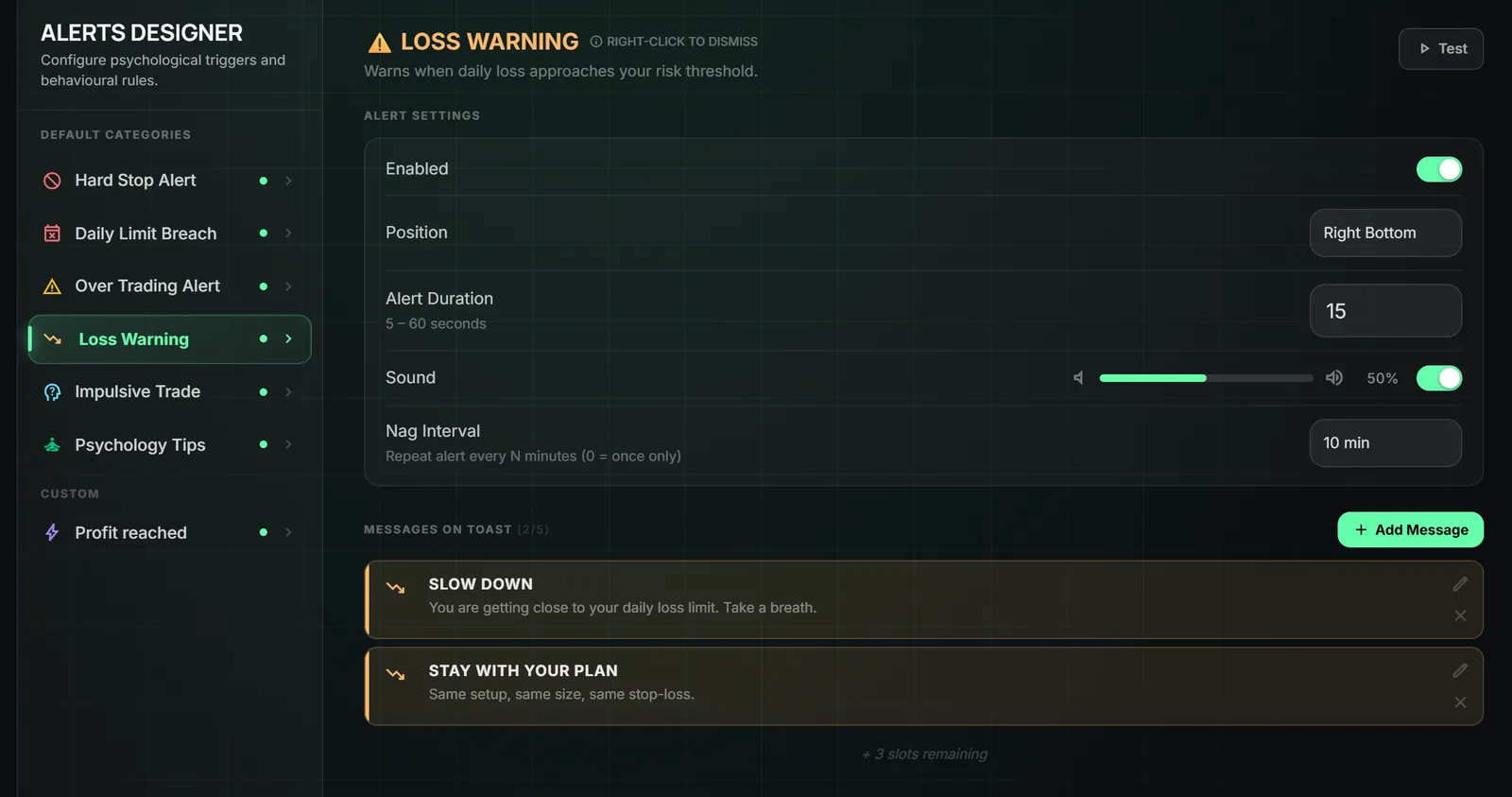
How LossGuardian helps: In Alerts Designer you can add your own message to an alert, up to 5 per alert. You can drop live numbers into it, like your booked P&L and your trade count. Loss Warning appears as your loss gets close to your limit, so your own words show up before the limit does.
With Advanced Mode there is also a note to self, up to 200 characters. It is shown when you are paused or done for the day. Read it then.
You can pick how long an alert stays, where it appears and whether it repeats. An alert you ignore protects nothing, so set it up so you will actually see it. The Alerts Designer guide shows how.
Rule 7: Make the stop real
The rule: When a limit is hit, you stop. Not "I will take one more". You stop.
Why it works: Every rule above fails if the last one is a suggestion. A rule you can argue with at the worst moment is a weak rule.
How LossGuardian helps: With Advanced Mode on, each rule can pause you for 15, 20, 30 or 60 minutes, or end your day with Done for today. Rules that last all day, like your loss limit and trade limit, always end the day. Exits always stay open, so you can close a position. You never get stuck in a trade.
While you are paused, you see your own day: your plan against where you are now, your loss budget, every trade on a timeline and your note to self. The pause becomes a short review, not a staring contest with the chart. The Paused and Done screen guide walks through it.
If you want a stronger finish, there is the Automatic Kill Switch. It is optional and works only with your consent. When you hit your limit, LossGuardian presses the broker's own Kill Switch for you. It is your broker's switch, not ours. Not every broker offers one, so check the page for the current list. Read more in stop trading after a loss automatically.
You can read how Advanced Mode works on its own page: Advanced Mode.
What LossGuardian does not do
It is read-only. It never places, changes or cancels an order. It will not size your trade for you either. If size is where you slip, use the position size calculator before the market opens and write the number on a sticky note.
Nothing here is a promise of results. Rules do not remove losses. Losses are part of trading. Rules change what you do next.
What you gain
You gain a day that ends when you said it would end. You gain a loss that stays the size it was.
You also gain something quieter. Each time a rule catches you, you see the moment a little more clearly. You notice the urge. You notice the clock. After enough of these, you hear the urge before it turns into a click.
That is the goal. A trader who needs the rules a little less each month. Software holds the rule while you are learning to hold it yourself.
Start small. Pick Rule 1 and Rule 2 this week. Add the rest as they start to feel normal. If you want to see all seven in one place, the Risk Manager guide is a good start.
Questions traders ask
What are the best rules to stop revenge trading?
Set a daily loss limit, wait after every loss, stop after losses in a row, cap your trades, set a cut-off time, write your own warning, and make your stop real. All seven are written down below, with how LossGuardian can help hold each one.
Why do I break my own trading rules after a loss?
After a loss your brain wants the money back now. The part of you that made the rules is not the part making the decision. That is why a rule you only keep when you feel calm needs something outside your head to hold it.
Can software stop me from revenge trading?
It can hold the rule while you are not thinking clearly. LossGuardian warns you, starts a cooldown, and can end your day when you hit your limits. It never places, changes or cancels an order. The choice stays yours.
Will I always need software to trade with discipline?
The goal is that you do not. Each time a rule catches you, you see the pattern more clearly. Over time you start to hear the urge before you act on it.
What is the first rule I should set?
Your daily loss limit. It is one number, set before the market opens, and it puts a floor under every bad day.
Can these revenge trading rules be automated?
Yes. LossGuardian turns each rule into a limit it watches from your broker: losses in a row, a wait after a trade, a daily loss limit and a cutoff time. It is read-only, and with Advanced Mode on a broken rule can pause new orders on your computer.
LossGuardian watches your positions across six Indian brokers and warns you the moment you cross your own daily loss limit. It is read-only: it never places, modifies or cancels an order.
Download LossGuardian