
Trading psychology
What is a trading discipline score, and how to improve it
P&L tells you if you won. A discipline score tells you if you followed your own rules, which is the part you control. Here is what it measures, what it cannot know, and five ways to raise it.
Quick answer: a trading discipline score is a number for how well you followed your own rules in a session. In LossGuardian it is out of 100 and it measures behaviour, not profit. It only judges the rules you set, so it cannot know why you took a trade. You raise it with five small habits, and none of them needs you to trade better.
Two traders end the day. One is up ₹3,000 after taking six trades he never planned. The other is down ₹1,500 after sticking to her plan all day.
Who had the better day? If you only look at P&L, it is him. If you look at what each of them controlled, it is her.
That gap is what a discipline score is for.
P&L tells you if you won
Profit and loss is the result. The market has a big say in it, and one session proves very little. You can break every rule and still finish green. You can follow every rule and still finish red.
If P&L is the only thing you track, you can learn the wrong lesson from both days. The green day teaches you that breaking rules works. The red day teaches you that rules do not.
You cannot control the result. You can control whether you did what you said you would do. A discipline score looks at that part only.
What a discipline score is
It is one number that answers a simple question. Did you trade the way you planned to trade today?
In LossGuardian, the score is out of 100. It measures how well you kept the rules you set that day. It measures behaviour, not profit.
You will see it in a few places. On the Trade Log it sits beside your win rate, max drawdown, current streak and profit factor. On the Done for today screen it shows today's score next to your 30-day average. In Past performance, it becomes a trend line across the days you traded.
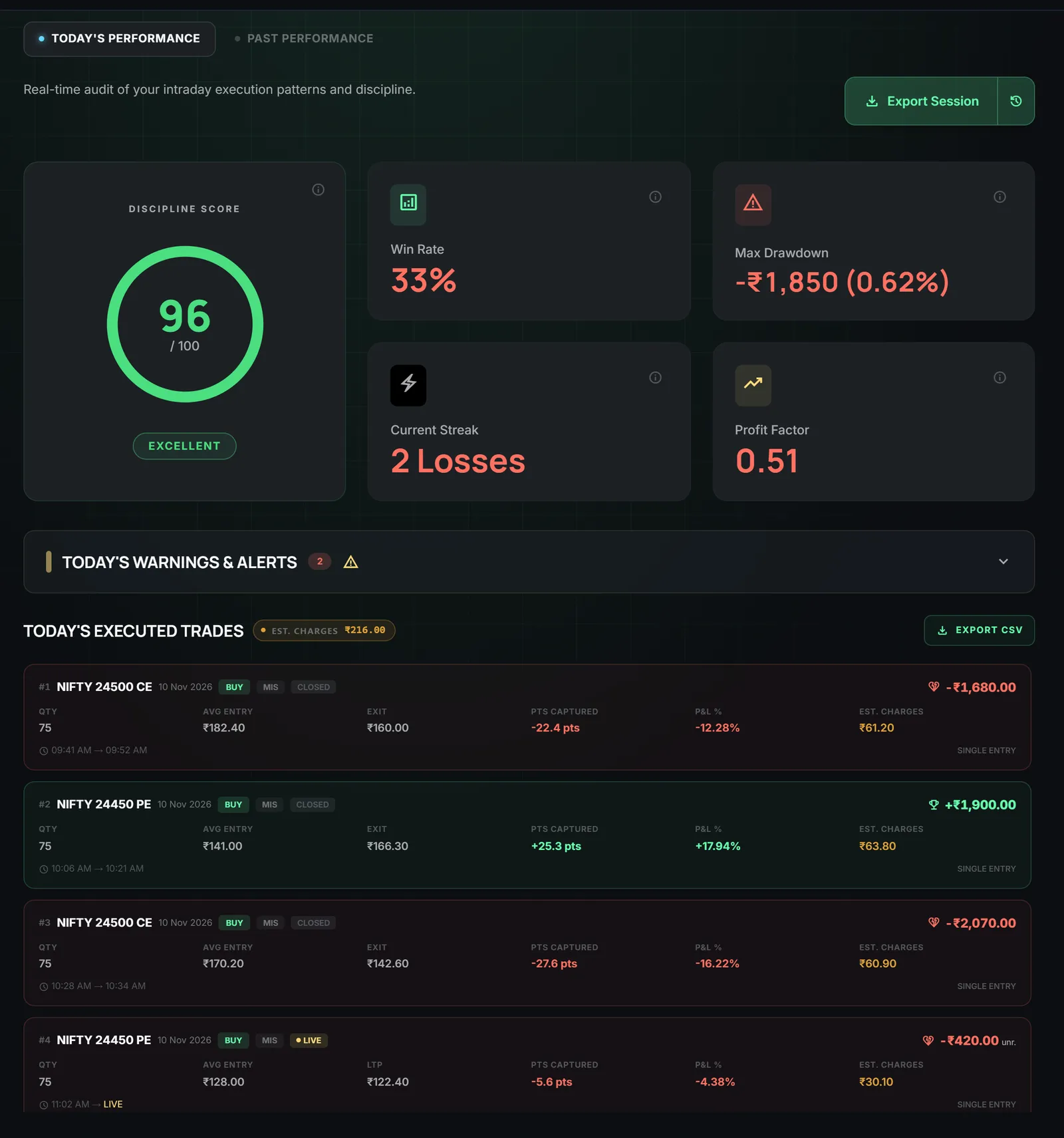
On the screen above, the score and the win rate sit side by side. They are not fighting each other. They answer different questions. One says how the trades turned out. The other says how the day was run.
You can read more about the score on the discipline score feature page. The Trade Log guide shows where each number sits on the screen.
What it cannot know
A score is only as honest as the rules behind it, so it helps to be plain about its limits.
It only judges the rules you set. If you never set a trade limit, the score has no trade limit to check. If your rules are loose, a high score only means you kept loose rules.
It cannot know why you took a trade. It sees what happened. It does not see your reasoning. A trade can be a perfect plan trade or a bored click, and from the outside they can look the same. You are the only one who knows which it was.
It does not say your rules are good. A score of 100 means you followed the rules. It does not say those rules make money. That depends on your strategy, and no score can promise it.
It is not a prediction. A high score is not a sign that profit is coming. Treat it as a mirror. It shows you the day you actually ran.
Used this way, it is a fair judge of one thing, and honest about the rest.
Five ways to improve it
None of these asks you to find better setups. They ask you to run the day more calmly.
1. Set your limits before the open
Your score can only reflect rules that exist. So write them down while you are calm, before the first candle.
In Risk Manager you can set a daily loss limit, a trade limit, a losing streak limit, an execution window and an impulse window. The Risk Manager guide explains what each one does.
Start a little better than you are now, not perfect. If you usually take twelve trades, try a limit of eight, not two. A rule you can keep is worth more than a strict one you break by 10 a.m. If you need help picking a loss number, read how to set a daily loss limit.
2. Trade inside your limits
This one is simple to say and hard to do. Once the limits exist, the score rewards you for staying within them.
The Done for today screen shows each limit you set and how close you are to it. When you can see "your plan vs now", it is harder to tell yourself you have not done that many trades yet. Treat the limit as the point where the day is finished, not as a number to negotiate.
3. Wait out the impulse window
The most common slip is the trade right after a loss. You want it back, so you click again within a minute or two.
The impulse window in Risk Manager is a number of minutes, from 1 to 15. If you trade again inside it, the trade is flagged as an impulse trade. When your trading looks emotional, LossGuardian can also start a cooldown timer, which you can set from 5 to 60 minutes.
So after a loss, do the boring thing. Get up. Drink some water. Look at the chart again when the window is over. The urge usually weakens if you give it a little time. There is more on this in how to build patience in trading.
4. Read your note to self
Write a line when you are calm, in plain words. Something like "I trade my setups only. The loss limit is the end of the day."
In Advanced Mode you can write this note to self, up to 200 characters. It is shown when you are paused or done, which is the moment you are least calm and most likely to need it. The Advanced Mode setup guide shows where to write it. The Paused and Done screen guide shows where it appears.
The note does not stop you from doing anything. It just puts your own calm voice in front of you at the right time.
5. Do a ten-minute weekly review
One week of scores tells you more than one day. Once a week, open Past performance and look at the last seven days.
- Look at the alert mix. Which rule did you break most?
- Find your worst day and open it. What time did the slide start?
- Write one rule change for next week and set it in Risk Manager.
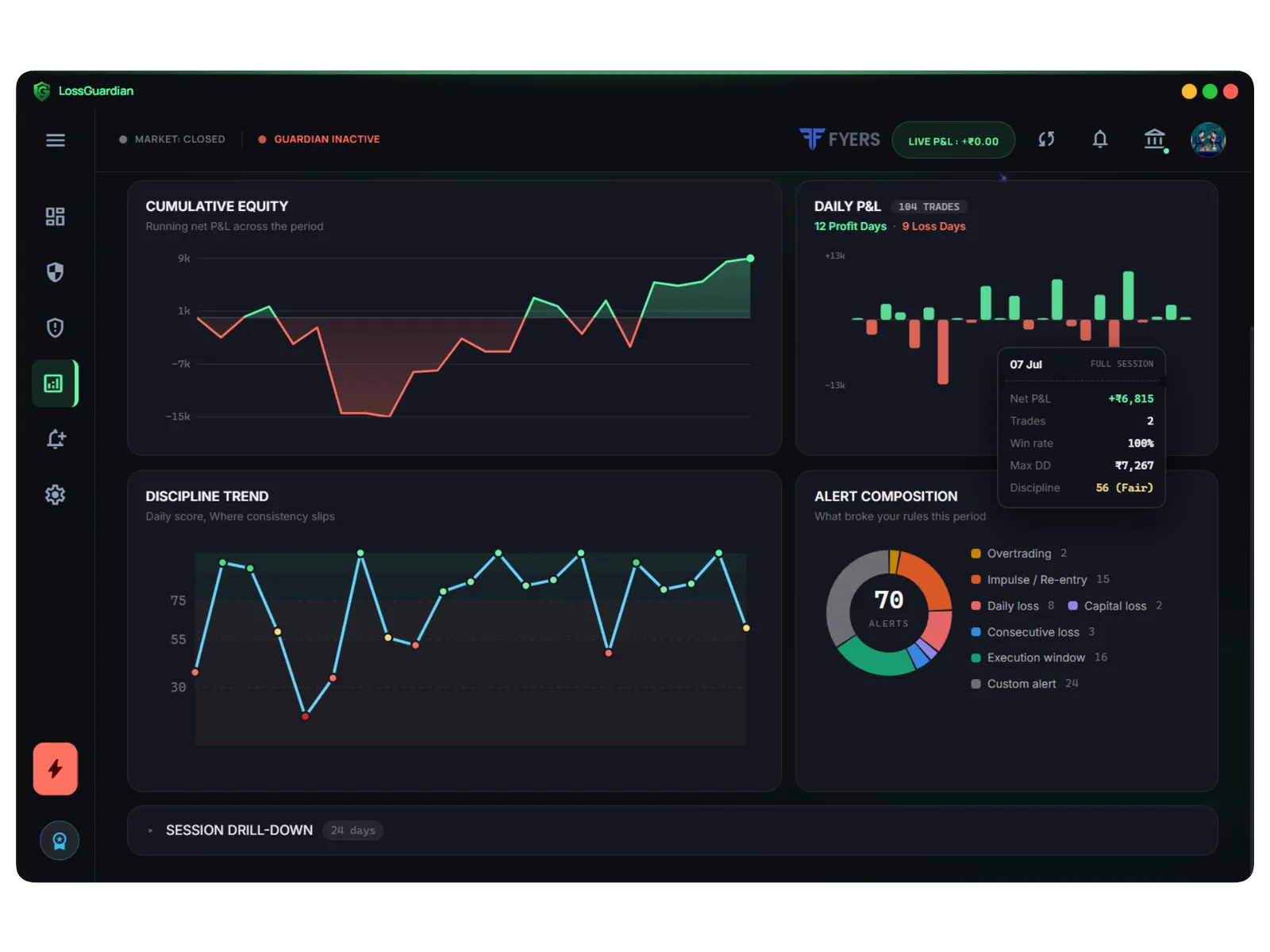
The chart above shows two things side by side. The discipline trend shows how your daily score moves. The alert composition shows what broke your rules in that period. The trend tells you if you are getting better. The alert mix tells you what to fix first.
Fix one thing at a time. If you want help reading the other numbers, trading analytics to find your mistakes walks through them.
How to read the trend
Do not chase a perfect score every day. You will have slips, and that is normal.
Watch the direction over a few weeks. Are the low days less low? Are they further apart? If yes, the habits are taking hold, even if today was a bad one.
Also compare the score with your P&L, and be honest about both. A high score with a loss means you ran the day well and the market went the other way. A low score with a profit means the profit came with broken rules, so it may not repeat. The second one is the day to worry about, because it teaches the wrong habit.
For the wider picture of building habits that last, read how to be a disciplined trader.
A note on what LossGuardian does
LossGuardian is read-only. It watches your trades from your broker, shows your score and your alerts, and reminds you of your own rules. It never places, changes or cancels an order, and it never closes a position. Every decision stays with you.
That is on purpose. The goal is a trader who needs the software a little less each month, because the habits now live in you.
Questions traders ask
What is a trading discipline score?
A number that shows how well you kept your own rules in a session. In LossGuardian it is out of 100 and it measures behaviour, not profit.
How do I measure my trading discipline?
Write your rules as numbers, such as a daily loss limit, a trade limit and a cut-off time. Then check how often you kept them. A discipline score turns that into one number you can follow from week to week.
Can I have a good discipline score on a losing day?
Yes. The score judges whether you kept your rules, not whether the market paid you. A day with a loss can still be a day of good process.
Does a high discipline score mean I will make money?
No. It tells you that you followed the rules you set. Whether those rules make money depends on your strategy.
How do I improve my trading discipline score?
Set your limits before the open, trade inside them, wait out the impulse window after a loss, read your note to self, and spend ten minutes each week looking at which rule you broke most.
Can LossGuardian place or close trades for me?
No. It is read-only. It never places, changes or cancels an order and never closes a position. You make every trade decision.
Which app gives a trading discipline score?
LossGuardian scores each day out of 100 by how well you kept your own rules, not by profit, and shows the trend and the rule that pulls it down most.
LossGuardian watches your positions across six Indian brokers and warns you the moment you cross your own daily loss limit. It is read-only: it never places, modifies or cancels an order.
Download LossGuardian