
Risk strategy
Best trading journal app in India? 8 things it must do (2026)
Looking for a trading journal app in India? Here is a plain checklist of what a good automatic trading journal should do, and how LossGuardian does on each point, limits included.
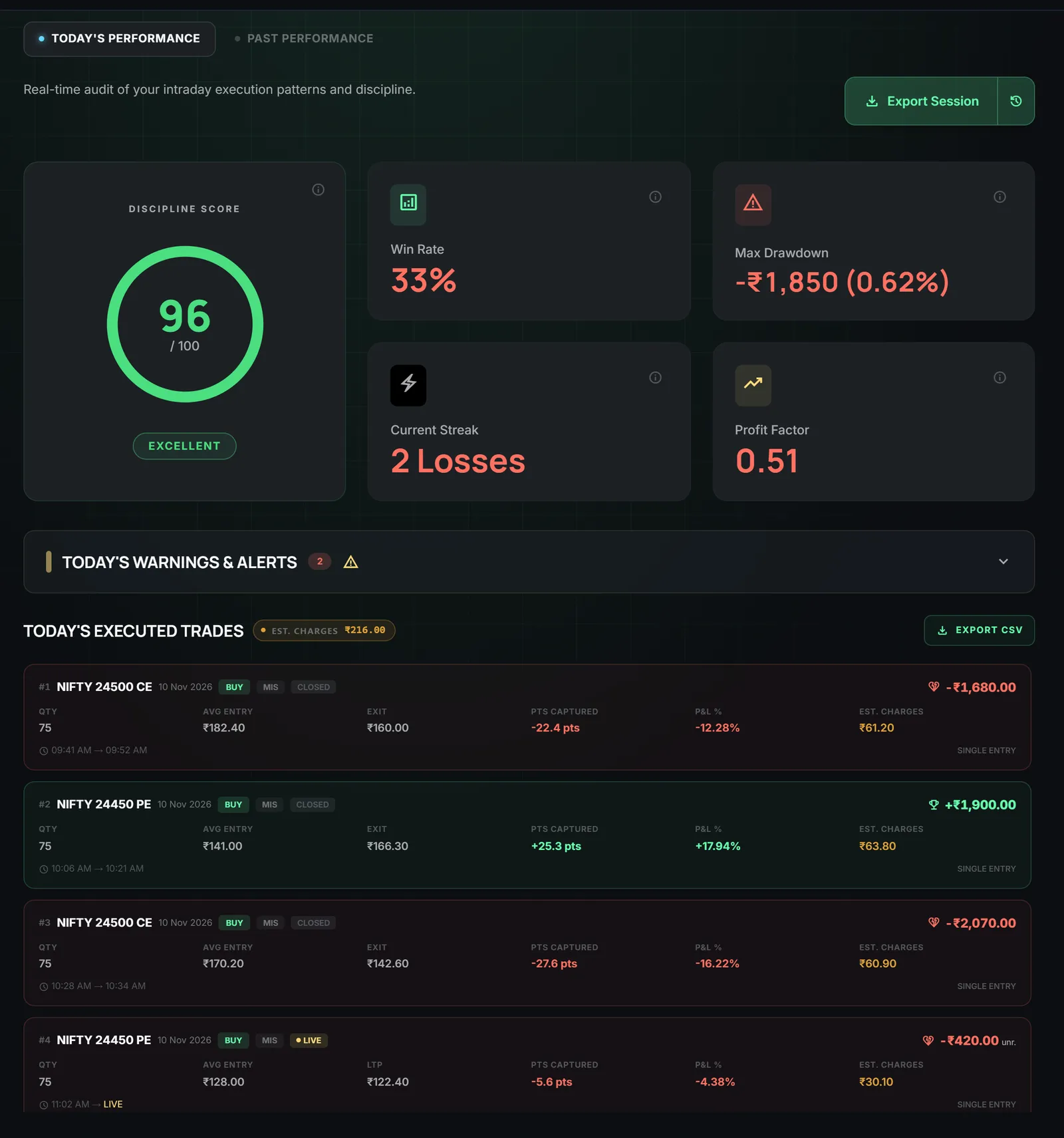
Quick answer: a good trading journal app for Indian traders fills itself from your broker, is read-only, keeps your data on your own computer, and shows your discipline and your repeated mistakes, not only your profit and loss. The eight checks below work for any journal, including ours.
Most traders mean to keep a journal. Most stop after a week or two. Writing down every trade by hand takes time, and on a bad day you are the least likely to do it.
So the question is not which journal looks best. It is which one you will still be using in three months. Use these eight checks to find out.
1. Does it fill itself from your broker?
What to look for: trades that appear on their own. No typing, no copying from the tradebook, no spreadsheet.
Why it matters: a journal you have to feed is a journal you will skip. The days you skip are usually the days you most needed it.
How LossGuardian does: you connect your broker once and your trades come in by themselves. There is nothing to type. Every trade shows quantity, entry, exit, points and P&L.
Limit: it can only show what your broker reports. It does not know why you took a trade. That part is yours to add in your own notes.
2. Is it read-only?
What to look for: a clear answer to "can this app place, change or cancel an order?" For a journal, the answer should be no.
Why it matters: a journal only needs to read. If an app asks for more, ask why.
How LossGuardian does: it is read-only. It reads your positions, orders and P&L, and it never places, changes or cancels an order. When you log in, you do it on your broker's own screen. For more on this, read is a trading risk app safe?
Limit: read-only means it will not trade for you, and it will not square off a position for you either. The decision always stays with you.
3. Does it keep a separate journal for each broker account?
What to look for: one journal per account. If you use more than one broker, mixing them gives you numbers that mean nothing.
Why it matters: your win rate on one account tells you little about another account with different habits.
How LossGuardian does: your history is kept separate for each broker account.
Limit: the journals are kept separate on purpose, so you read each account on its own.
4. Does it track discipline, not only profit?
What to look for: a number or a view that shows whether you followed your own rules. P&L alone cannot show this. A winning day can be full of rule breaks, and a losing day can be a perfectly disciplined one.
Why it matters: you remember the one great trade. You forget the four small revenge trades that came after it. Profit hides that. Discipline shows it.
How LossGuardian does: it gives you a discipline score out of 100 for how well you kept the rules you set that day. It measures behaviour, not profit. It also shows win rate, max drawdown, your current streak and profit factor, and every alert of the day in order with your P&L at that moment.
Limit: the score only judges the rules you actually set. If you set no rules, there is little to measure. It is not a verdict on you as a trader.
5. Does it show what each trade cost you?
What to look for: charges listed next to your trades, so you see what you kept and not only what you made.
Why it matters: a day that looks flat on the screen can be a loss after brokerage and taxes. Many small trades make that worse.
How LossGuardian does: each executed trade shows estimated charges, worked out from brokerage and taxes at your broker's published rates. The estimated charges for the day are listed separately.
Limit: they are estimates. Your broker's contract note is the final word, and you should trust it over any app.
6. Can you open one past day in full?
What to look for: the ability to click a single day and see all of it. Not only a monthly total.
Why it matters: bad days have a shape. If you can see the time the slide began, you can learn to spot it earlier next time.
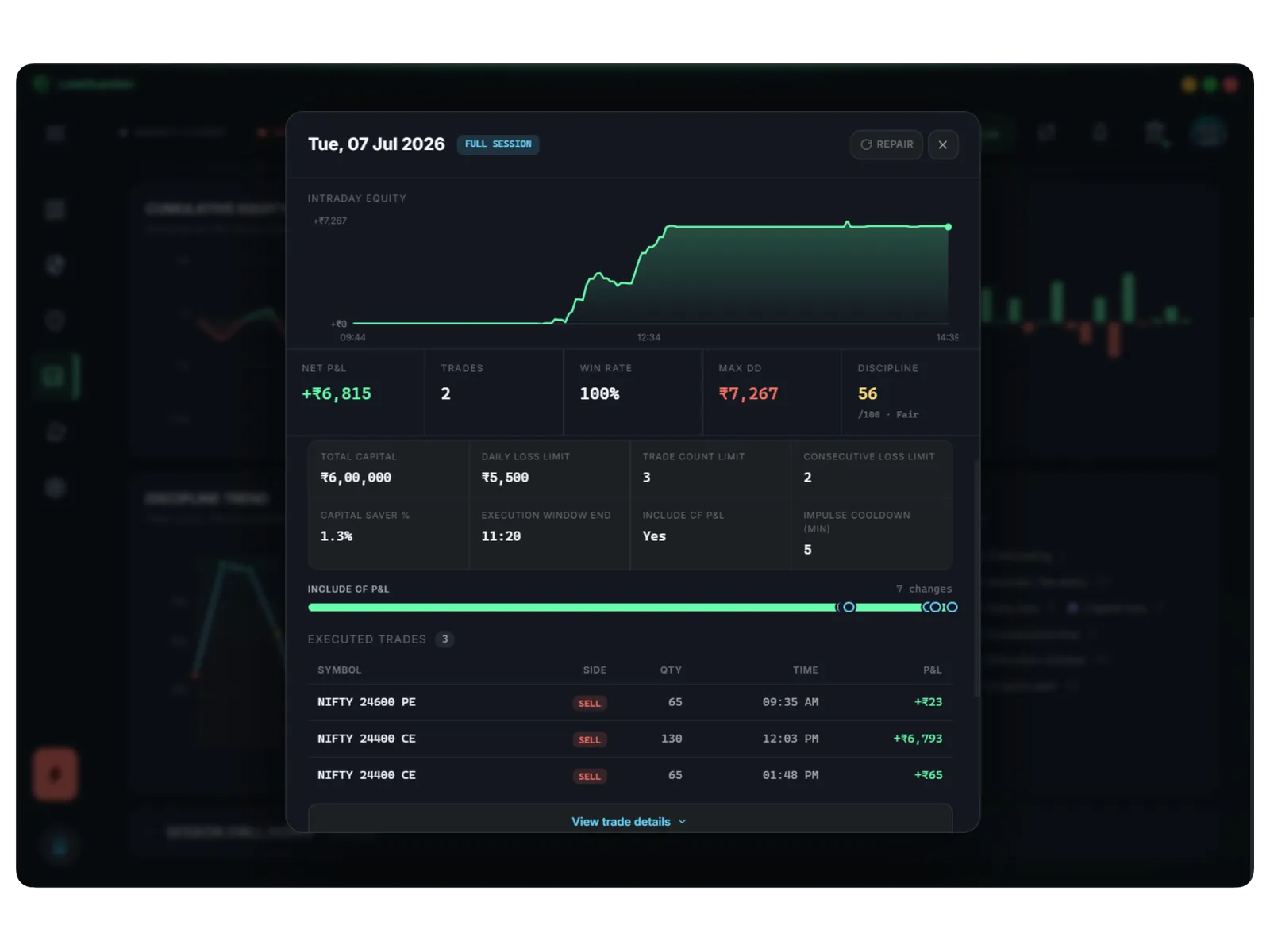
How LossGuardian does: you open any day to see its equity curve, net P&L, trades, win rate, drawdown and discipline. You also see the limits you had set that day, so you can compare what you planned with what you did. If you change a limit during the day, the day view shows that too.
Limit: it shows the days LossGuardian has on your computer. It is a record of your sessions with the app, not a replacement for your broker's own statements.
7. Does it help you review a week and change one thing?
What to look for: a view over a week or a month that shows your patterns, not a pile of numbers.
Why it matters: a journal helps only if it changes what you do next week. The best habit is small. Review once, change one rule.
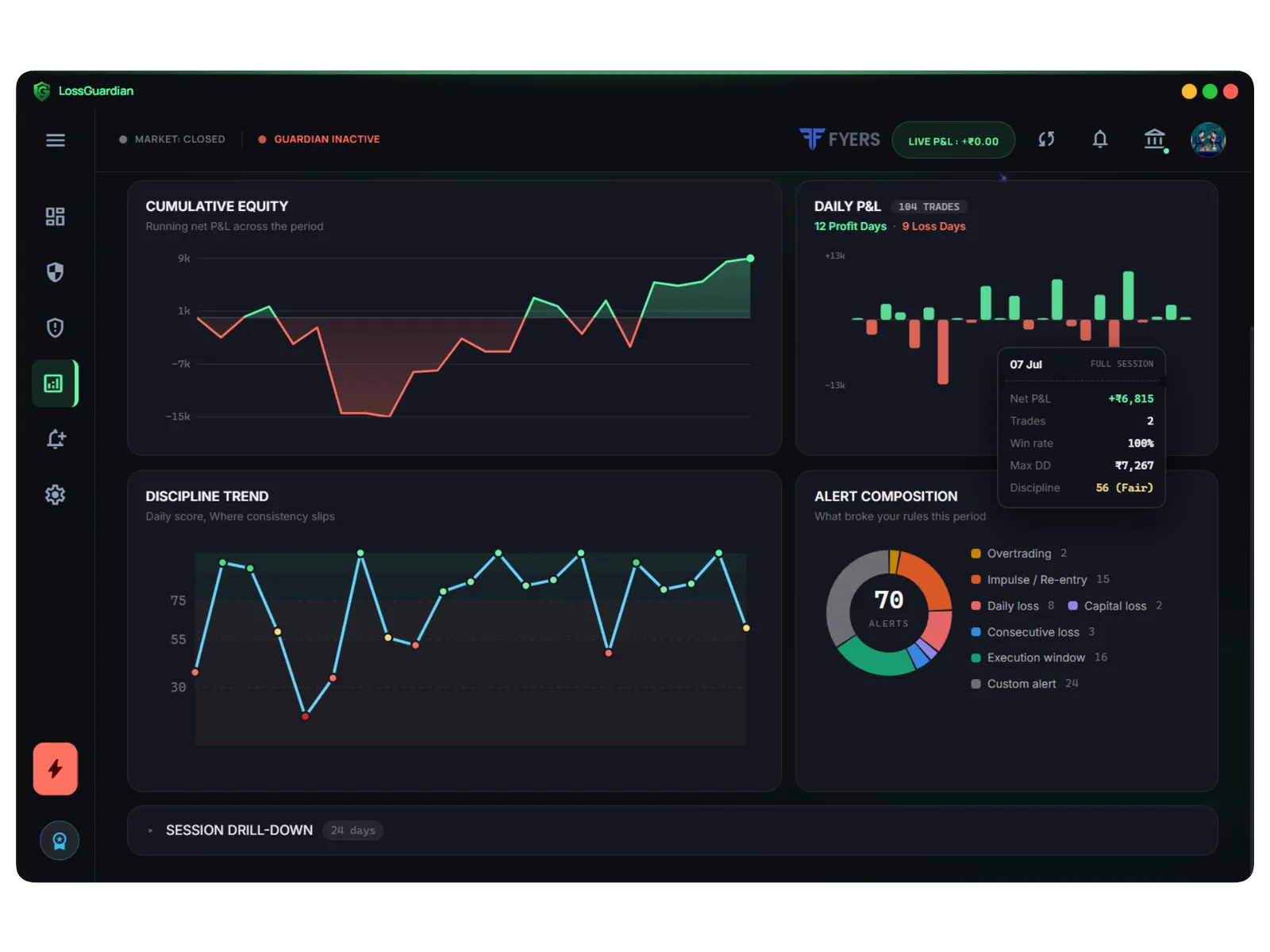
How LossGuardian does: Past performance lets you look back over a week, a month or any range. It shows cumulative equity, daily P&L, your discipline trend, and an alert mix of which rules you broke most often. The guide suggests a ten-minute weekly review:
- Open Past performance for the last week.
- Look at the alert mix. Which rule did you break most?
- Find the worst day and open it. What time did the slide start?
- Write one rule change for next week, and set it in Risk Manager.
Limit: it shows you the pattern. It does not decide what to change. That call is yours.
8. Does it stay on your computer, and work with your broker?
What to look for: where your trades are stored, and whether your broker is supported.
Why it matters: your trading history is private financial data. You should know who holds it. And a journal that does not support your broker is no use to you.
How LossGuardian does: your journal is stored on your own computer. It works with Zerodha, Fyers, Dhan, Upstox, Groww and Angel One. Zerodha, Fyers and Dhan connect in a few clicks. Upstox, Groww and Angel One need an API key from your own broker account first. The connect your broker guide walks through each one.
Limit: LossGuardian is installed on Windows. If you want a journal in a browser tab on any device, this is a different kind of tool.
What about export?
Sometimes you want your own notes alongside the numbers. LossGuardian has an Export Session button that saves a full day as a file, for your own journal or notes. It is a small thing, but it means your data is never stuck inside one app.
Where this leaves you
No journal will make you a better trader on its own. What it can do is show you what you would rather not see, every week, without asking you to do an hour of typing first.
The journal is also part of a bigger loop. In the morning you set your rules in Risk Manager. During the day you get warned as you near them. Afterwards you review what happened. Our guide to trading analytics and finding your mistakes goes deeper on that last step.
If you want to see how the journal works screen by screen, read the Trade Log and Analytics guide or the trading journal feature page. To compare it with other tools on the wider question of risk, see our checklist for a risk management app.
LossGuardian is a read-only risk and discipline tool. It is not investment advice and it does not promise any result. It shows you your own trading, so you can decide what to do about it.
Questions traders ask
What should a trading journal app for Indian traders do?
It should fill itself from your broker so you type nothing, show your trades with charges, track your discipline and not only your profit, let you open any past day in full, and keep your data private. Use the checklist in this guide to compare any journal, including LossGuardian.
Is there an automatic trading journal?
Yes. LossGuardian reads your trades from your broker and builds the journal for you every day. You do not enter anything by hand.
Do I need to enter my trades myself?
No. LossGuardian reads them from your broker. There is nothing to type.
Where is my trading journal stored?
On your own computer, kept separate for each broker account.
Are the charges in the journal exact?
No. They are estimates from your broker's published rates. Your broker's contract note is the final word.
Can LossGuardian place or change orders while it keeps my journal?
No. It is read-only. It reads your positions, orders and P&L and never places, changes or cancels an order.
Is there an automatic trading journal for Indian brokers?
LossGuardian keeps one for you. It reads your trades from Zerodha, Fyers, Dhan, Upstox, Angel One or Groww, with charges, alerts and a discipline score, and stores it on your own computer.
LossGuardian watches your positions across six Indian brokers and warns you the moment you cross your own daily loss limit. It is read-only: it never places, modifies or cancels an order.
Download LossGuardian