
How-to guides
Best kill switch software for Indian traders? 8 things to check (2026)
Choosing kill switch software for trading in India? Here are 8 things to check before you trust any tool, and an honest look at how LossGuardian does on each, limits included.
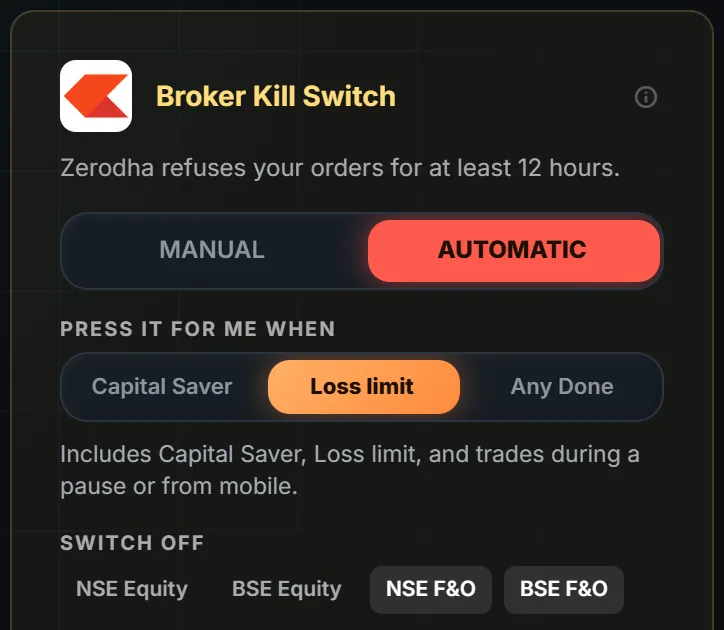
Quick answer: good kill switch software uses your broker's own Kill Switch, never touches an order or a position, asks for your consent, tells you plainly what it cannot cover, and shows you your day so you need it less. Here are eight checks you can run on any tool, ours included.
You will not find a ranked list here. A list like that would only be one company's opinion of itself. What helps more is a set of questions you can ask before you trust any software with a bad day.
For each one, we say what to look for, why it matters, and how LossGuardian does, including where it falls short.
1. Does it use your broker's own Kill Switch?
What to look for: a tool that works with the switch your broker already has, not a copy of its own.
Why it matters: when your broker's Kill Switch is on, your broker itself refuses new orders. That covers every device you own. A stop that lives only inside one program can be got around the moment you open another screen.
How LossGuardian does: it works with your broker's own Kill Switch. It is always the broker's switch, never ours. With your consent, it presses the switch for you when you are done for the day. This works for Zerodha, Fyers, Dhan, Upstox and Groww.
The limit: Angel One has no Kill Switch, so there is nothing to press there. See check 7.
2. Is it read-only?
What to look for: software that cannot place, change or cancel an order.
Why it matters: a tool that can trade for you can also trade wrongly. The fewer powers it has over your account, the less can go wrong.
How LossGuardian does: it never places, changes or cancels an order. It watches and it stops. Closing a trade is always your own action in your broker.
The limit: because it is read-only, it will not rescue a position for you. That is a choice, and we think a good one. But you should know it.
3. Do you stay in control?
What to look for: consent, and a way to choose how strict it is.
Why it matters: software that acts for you should only do so because you said yes. You should also be able to pick the level that fits how you trade.
How LossGuardian does: the Automatic Kill Switch is optional. It is off until you choose Automatic and agree, once per broker. You choose which stops lead to it: Capital Saver only, Loss limit, or Any Done. A short pause never presses it. If you prefer to press the switch yourself, choose Manual and LossGuardian takes you to your broker's Kill Switch page in one click.
The limit: during market hours your choice holds, so a bad moment cannot undo a good plan. You can change it outside market hours. Some traders find that strict. It is on purpose.
Not sure which mode suits you? Read automatic vs manual kill switch.
4. What does it do with your open positions?
What to look for: a clear answer. Some tools square off your trades when a limit breaks. Others do nothing about them.
Why it matters: a forced exit can mean a bad price at a bad moment. A stop that ignores your open trade can mean a loss that keeps growing.
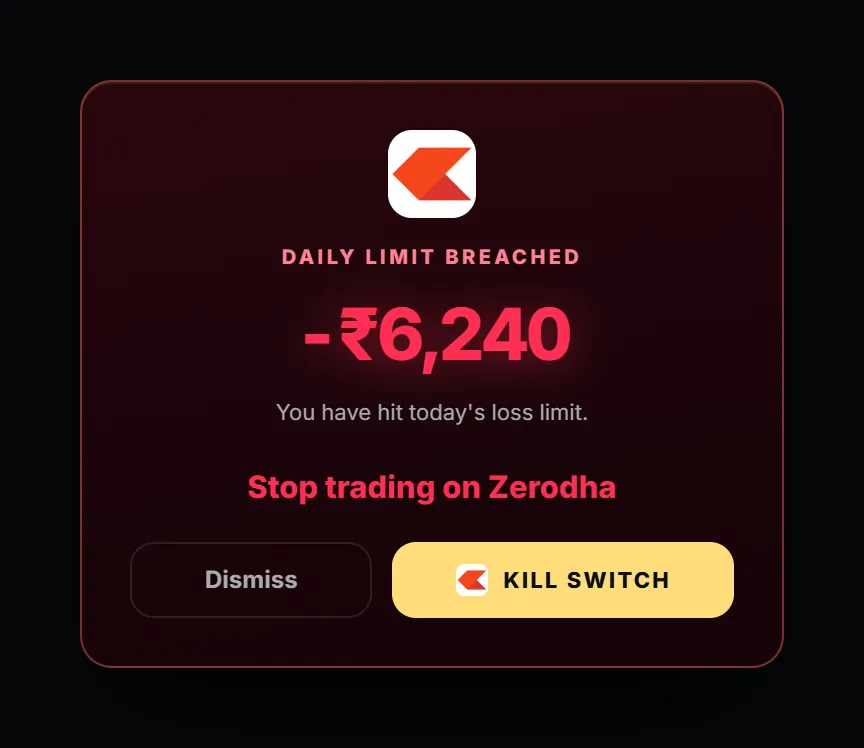
How LossGuardian does: it never closes a position. The Automatic Kill Switch waits until you are out of your trades before it presses. On Dhan it also waits until you have no pending orders. Even when you are paused or done for the day, exits stay open. There is an "I need to exit a position" button for that.
The limit: the stop is not instant if you are still in a trade. You decide when to exit. The switch follows.
5. Is it honest about what it stops, and for how long?
What to look for: plain words about each broker. Brokers do not all work the same way, and a tool that says everything works the same everywhere is guessing.
Why it matters: you should know what is covered before the bad day, not during it.
How LossGuardian does: it says it per broker. Zerodha and Upstox let you pick the segments to switch off, with F&O as the default. Upstox sends a code to your email that you type in yourself. Groww uses its own name for the switch, and Dhan calls it Kill Switch for Over-Trading. On Dhan, the manual link opens Dhan's Money page and you carry on from there.
The limit: how long the switch stays on is your broker's rule, and brokers change their rules. We will not quote one number for all of them. Check your broker's help page. What holds for all of them: once it is on, nobody can switch it off early.
6. Does it cover every device?
What to look for: whether the stop reaches your phone.
Why it matters: many traders pause on the computer and then trade from the phone. A stop that covers one device is only half a stop.
How LossGuardian does: because it uses your broker's own Kill Switch, your broker refuses new orders from every device, including its phone app.
The limit: this is true only where a broker Kill Switch exists. Angel One has none. There, Advanced Mode pauses trading on your computer until the close, and the phone app is outside it. On days you trade from your phone, keep that in mind. See Angel One and the kill switch.
7. What happens if your broker has no Kill Switch?
What to look for: an honest fallback, not a pretend one.
Why it matters: Angel One has no Kill Switch. It has Secure Exit, which closes positions at a profit or loss level you set. That is a different tool.
How LossGuardian does: it does not claim to press anything at Angel One. Advanced Mode is the stop instead. When you are done for the day, trading on your computer pauses until the market closes.
The limit: that is a pause on your computer, not your broker refusing orders. Read the Angel One page for the full picture, and how Advanced Mode works.
8. Does it show you your day while you are stopped?
What to look for: something useful on the screen when the stop happens, not a blank page.
Why it matters: the minutes after a stop are when a trader is most likely to do something rash. A stop that only says "no" gives your mind nothing to do. A stop that shows you the day gives it a job.
How LossGuardian does: when you are paused or done for the day, you see your own day. Your plan against where you are now, your loss budget, every trade on a timeline, your P&L, your discipline score and the note you wrote to yourself when you were calm. It also shows whether your broker's Kill Switch is on, and when it comes off. Details are in the guide to the Paused and Done screen.
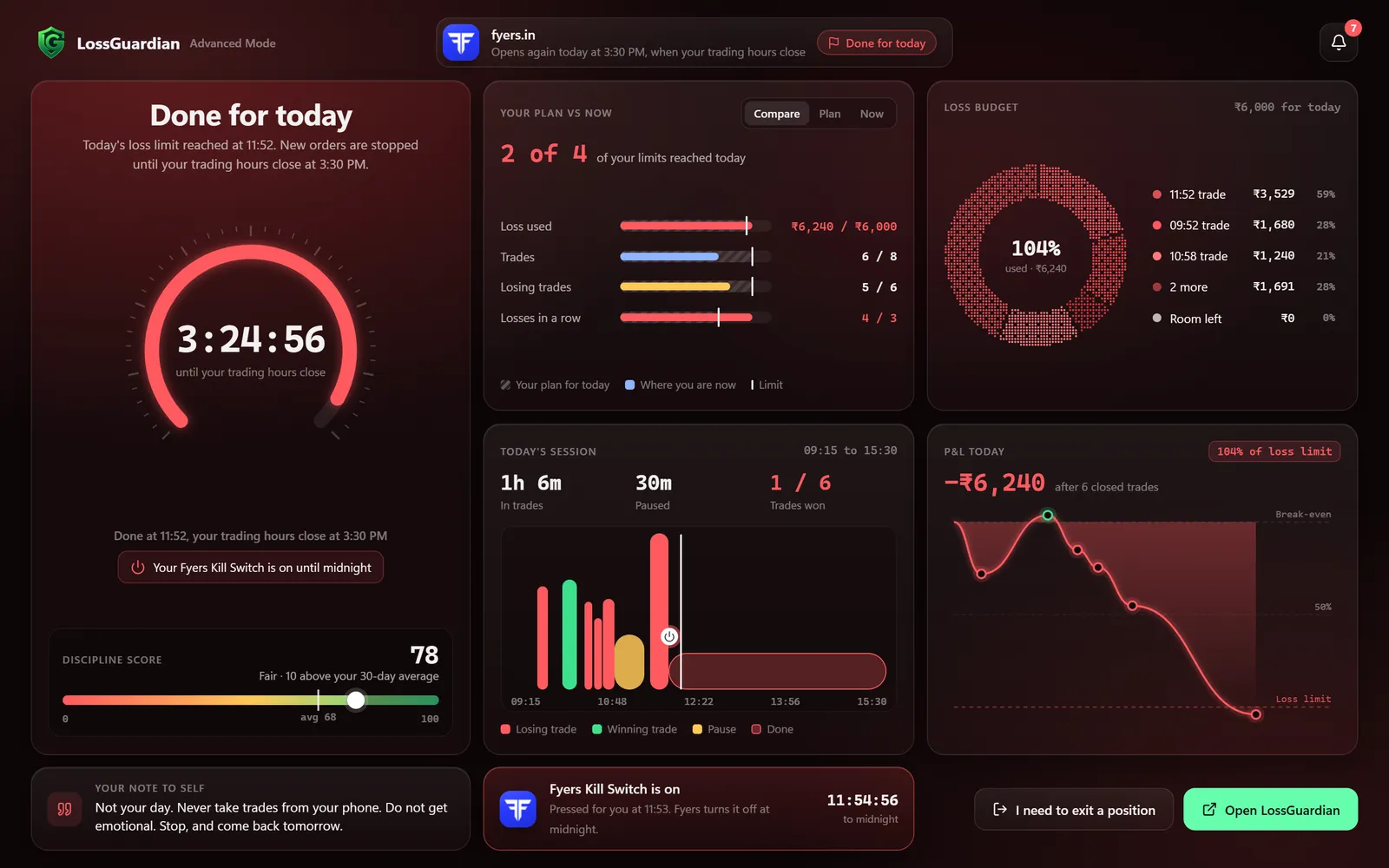
The limit: a screen cannot make you read it. It only makes reading easy. Over time your own record is the thing that helps. Your own record shows your pattern, and needing the kill switch less is the goal. More on that in automated risk management software for traders.
A short table to keep
| Check | What to look for |
|---|---|
| Your broker's own Kill Switch | Yes, not a copy |
| Places, changes or cancels orders | Never |
| Consent and choice | Optional, with levels and a Manual mode |
| Open positions | Never closed for you |
| Per-broker honesty | What it stops, and a plain answer where it cannot |
| Every device | Yes, where the broker has a Kill Switch |
| No Kill Switch at your broker | An honest fallback, with its limits stated |
| Your day while stopped | Your numbers, not a blank page |
One last thing to check
Does it fit how you trade? If you already stop when you hit your limit, Manual may be all you need. If you know you will not, Automatic is there for that. Both are optional, and you can try either.
For the longer version of what good software does, read what the most advanced automatic kill switch software should do. To see how it works with your broker, the Automatic Kill Switch page has the details, and how to connect your broker walks you through setup. The Risk Manager guide shows where each setting lives.
If you want the basics first, start with what a kill switch in trading actually is.
Broker pages: Zerodha, Fyers, Dhan, Upstox, Groww, Angel One.
Questions traders ask
What should I look for in kill switch software?
Check that it works with your broker's own Kill Switch, that it never places, changes or cancels an order, that it needs your consent, that it does not touch open positions, and that it is honest about what it can and cannot stop for your broker.
Is there kill switch software that works with my broker's Kill Switch?
Yes. With your consent, LossGuardian presses your broker's own Kill Switch for you when you are done for the day. It works this way for Zerodha, Fyers, Dhan, Upstox and Groww. You can also choose Manual and press it yourself.
Does kill switch software need access to place trades?
It should not. LossGuardian is read-only. It cannot place, change or cancel an order, and it never closes a position.
What if my broker has no Kill Switch?
Angel One has none. For Angel One traders, LossGuardian Advanced Mode pauses trading on your computer until the market closes. Your broker's phone app is outside it.
Can I trust software to press my kill switch?
Only if it is optional and clear. LossGuardian's Automatic Kill Switch is off until you choose it and agree, broker by broker. You pick which stops lead to it, and outside market hours you can go back to Manual.
How long does a broker's Kill Switch stay on?
That is your broker's rule, and it can change, so check your broker's own help page. Once it is on, nobody can switch it off early, not even you.
Is there kill switch software that works with Indian brokers?
LossGuardian works with the own Kill Switch of Zerodha, Fyers, Dhan, Upstox and Groww, pressed for you with consent or opened in one click. It is read-only and has one price for every broker.
LossGuardian watches your positions across six Indian brokers and warns you the moment you cross your own daily loss limit. It is read-only: it never places, modifies or cancels an order.
Download LossGuardian