
How-to guides
Angel One Kill Switch? None Built In. What to Use Instead
Does Angel One have a kill switch? No. As of November 2026 it has Secure Exit, which is a different tool. Here is what that means and what Angel One traders can use instead.
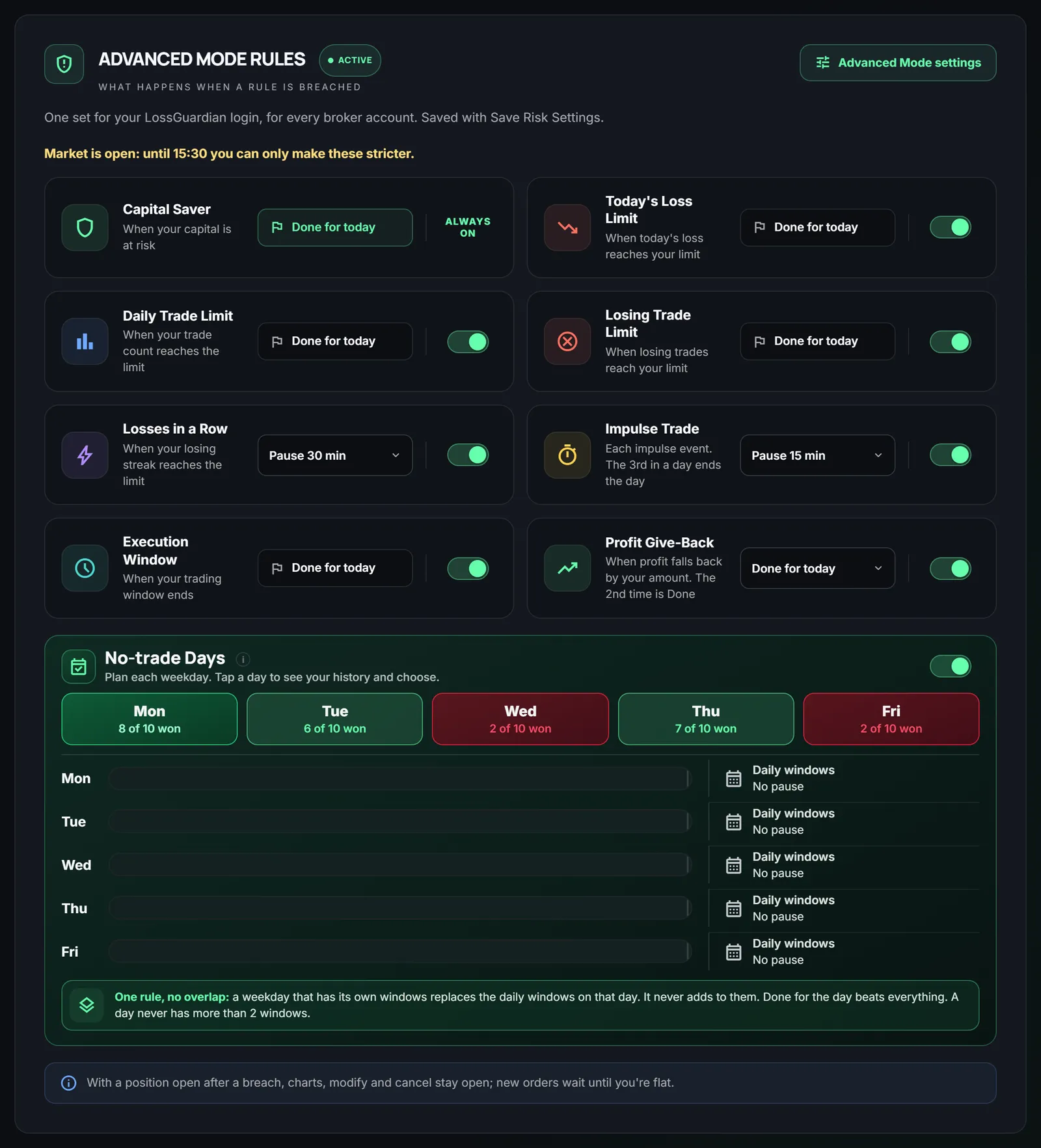
Quick answer: no, Angel One does not have a Kill Switch. As of November 2026 it has Secure Exit, which is a different tool. If you want a stop for the whole day, LossGuardian Advanced Mode gives Angel One traders one that works like a Kill Switch, on your computer.
You hit your loss limit at 11 AM. You know you should stop. But the next order is one tap away.
So you look for the Kill Switch. Zerodha has one. Fyers has one. You search for "Angel One kill switch" and find nothing clear.
That is because there is nothing to find. Here is the honest answer, and what you can do about it.
What a Kill Switch does
A Kill Switch is a broker tool. You turn it on, and your broker refuses new orders until the next session. It does not close your trades. It only stops new ones.
That is the whole point. It takes the next bad trade away from you at the exact moment you want it most. We explain the idea in what a kill switch is in trading.
Does Angel One have one?
No. As of November 2026, Angel One has no Kill Switch that stops new orders until the next session.
It has something called Secure Exit. People often mix the two up, so let us be clear.
What Secure Exit is, and what it is not
Secure Exit is a different tool. It closes your positions and cancels pending orders when a profit or loss level you set is hit.
That can help. If your loss reaches a number you chose, your open trades are closed for you.
But look at what it does not do. It does not stop you from placing a new order afterwards. You can still open a fresh trade a minute later. For a trader who revenge trades, that is the exact problem.
So Secure Exit is an exit tool. A Kill Switch is a stop-for-the-day tool. They solve different problems. Check Angel One's own help pages for how Secure Exit works today, because brokers change things.
What to use instead
LossGuardian is a read-only risk app. It watches your account and your limits. It never places, changes or cancels an order.
Its Advanced Mode is the stop for Angel One traders. Here is what it does.
You set your rules once, before the market opens. For example, a daily loss limit, a limit on trades, or a limit on losing trades. For each rule you choose what happens when it is hit. Either a short pause, or Done for today.
When you are done for the day, your trading screens and new orders pause on your computer until the market closes. Your exits stay open. You can always close a trade you are already in.
It works like a Kill Switch for Angel One traders. And it never touches a single trade.
Notice the third point. While the market is open, you can only make your rules stricter. You cannot loosen them. That is on purpose. A bad moment should not be able to undo a good plan.
You can read more on the Advanced Mode page. If you want to see how the paused and done screens look, there is a short guide to the Paused and Done screens. To set it up, follow the Advanced Mode setup guide.
The honest limit
Advanced Mode covers trading on your computer. The Angel One phone app is outside it.
So if you trade from your phone, it cannot stop you there. Be careful on those days. A simple habit helps. On a day you are done, close the app on your phone and leave it closed.
We would rather tell you this now than have you find out at 1 PM.
Why this is different from a Kill Switch
When a broker's Kill Switch is on, the broker itself refuses orders, from every device. Angel One has no such switch, so there is nothing for LossGuardian to press. We will not pretend there is.
What you get instead is a stop on your computer. If you also trade on the phone, that is a real gap, and you should know it.
If you use another broker, the answer is different. Zerodha, Fyers, Dhan, Upstox and Groww each have their own Kill Switch. You can read how it works in the automatic Kill Switch page.
What you gain
You do not need more willpower. You need the decision made earlier, by a calmer you.
With a stop in place, a few things change.
- Your worst day has a ceiling you chose. Not one the market chose for you.
- The urge to win it back loses its chance. New orders are paused, so the urge has nowhere to go.
- You keep control of your trades. Nothing is closed or placed for you. You decide about every position.
- You end the day with a clear head. You can look at what happened, without a fresh loss on top.
None of this promises you will make money. No tool can. It only makes sure one bad hour does not become one bad month.
If you want to see how Angel One works with LossGuardian, the Angel One page has the details. And if overtrading is your real issue, read how to stop overtrading on Angel One.
The short version
- Angel One has no Kill Switch. It has Secure Exit, a different tool.
- Secure Exit closes positions and cancels pending orders at a level you set. It does not stop new orders.
- LossGuardian Advanced Mode pauses your trading screens and new orders on your computer when you are done for the day.
- The Angel One phone app is outside it.
- LossGuardian is read-only. It never touches a trade.
Questions traders ask
Does Angel One have a kill switch?
No. As of November 2026, Angel One has no Kill Switch that stops new orders until the next session. It has Secure Exit, which is a different tool. Check Angel One's own help pages, because brokers can change this.
What is Angel One Secure Exit?
Secure Exit closes your positions and cancels pending orders when a profit or loss level you set is hit. It does not stop you from placing new orders afterwards. That is the difference from a Kill Switch.
What can I use instead of an Angel One kill switch?
LossGuardian Advanced Mode. When you are done for the day, your trading screens and new orders pause on your computer until the market closes. It works like a Kill Switch for Angel One traders, and it never touches a trade.
Does this cover the Angel One phone app?
No. The Angel One phone app is outside it. On days you trade from your phone, you need to be careful on your own.
Can LossGuardian place or close trades in my Angel One account?
No. LossGuardian is read-only. It never places, changes or cancels an order. You close your own trades.
Is there a way to stop trading for the day on Angel One?
Angel One has no Kill Switch of its own. LossGuardian Advanced Mode gives Angel One traders a stop that works like one on their computer: new orders pause until the close, and exits stay open. The Angel One phone app is outside it.
LossGuardian watches your positions across six Indian brokers and warns you the moment you cross your own daily loss limit. It is read-only: it never places, modifies or cancels an order.
Download LossGuardian