
How-to guides
Zerodha Kill Switch: how to turn it on after a loss, and how to make it automatic
Zerodha has its own Kill Switch, but you have to press it yourself, and that is the hard part after a loss. Here is how it works, how long it lasts, and how Automatic does it for you.
Quick answer: the Kill Switch is Zerodha's own way of refusing your orders in the segments you switch off, until the next session. Zerodha lets you press it, but nothing presses it for you, and after a loss that is exactly when you will not. LossGuardian can press it for you when you are done for the day, with your consent. Or you can keep it on Manual and press it yourself in one click.
You are down more than you planned. It is 12:40 PM. A setup is on the screen and your hand is already on the buy button.
Zerodha has a Kill Switch for this moment. It has had one for years. But it sits on a segment page you have to open, and nobody opens it when they are angry at the market. So it stays off, and the day gets worse.
This article explains what the Zerodha Kill Switch does, how long it lasts, and how to make it work on your worst day, not just your best one.
What the Zerodha Kill Switch does
Zerodha calls it the Kill Switch. When you switch off a segment, Zerodha stops accepting your orders there. It is Zerodha refusing the orders, so it covers every device, including your phone.
A few facts worth knowing before you ever need it:
- It works per segment. You choose which segments to switch off. Switching off F&O leaves Equity open.
- Close your positions first. Zerodha will not let you switch a segment off while you hold open positions in it.
- It lasts until the next session. Zerodha says so in its own confirm box.
- There is no early undo. Nobody can lift it before the next session, not you and not Zerodha support.
That last point is the whole reason it works. If you could undo it in a minute, you would, and it would protect nothing.
Check Zerodha's own help pages too, because brokers change their rules.
Why most traders never press it
Pressing the Kill Switch is a calm decision. The moment you need it is not calm.
After a loss, the urge is to win the money back now. It feels like fixing a mistake, not like taking a new risk. We wrote about this in why you feel compelled to trade after a loss. A rule you made in the morning has to be kept by something that is not you at 12:40 PM.
Manual: you press it, in one click
LossGuardian is read-only and watches your Zerodha account through Zerodha's official API. It reads your positions and your P&L. When you hit the daily loss limit you set, it tells you so.
In Manual mode, that alert carries a Kill Switch button. One click takes you to Zerodha's own Kill Switch page. You do the rest there, in Zerodha.
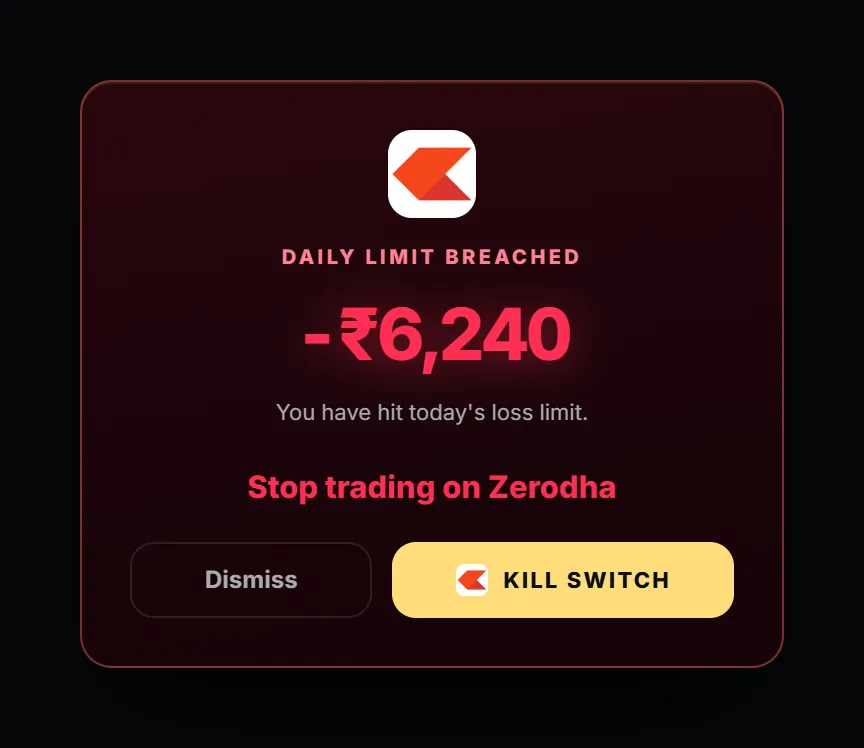
Manual suits you if you want the last word on every decision and you know you will actually press it.
Automatic: LossGuardian presses it, with your consent
Automatic is for the trader who knows that, after a bad loss, the switch will stay off.
You decide once, in the morning, when you are calm. In Risk Manager, set Zerodha's Kill Switch to Automatic and give your consent. When you are done for the day and out of your trades, LossGuardian presses Zerodha's own Kill Switch for you.
It is Zerodha's own switch. It is optional, and it stays off until you choose it.
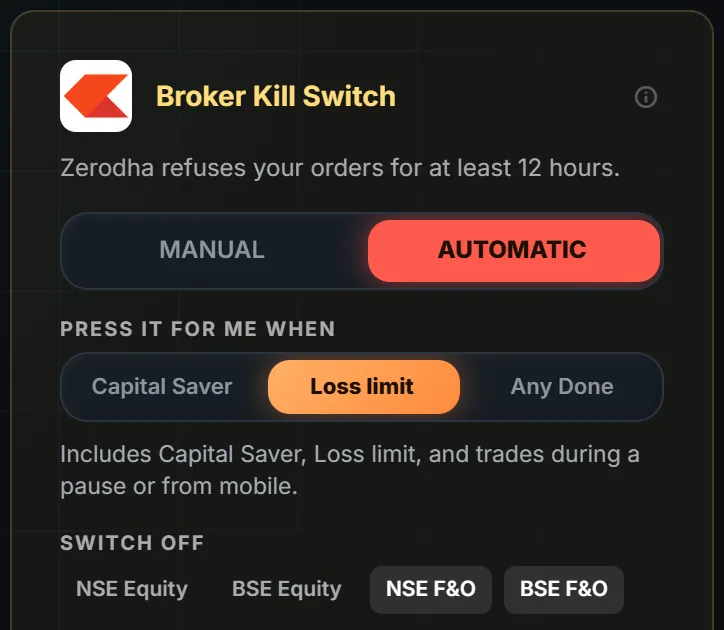
The card shows three things you control:
- Manual or Automatic. Your choice, broker by broker.
- When it presses. Capital Saver, Loss limit, or Any Done. Capital Saver is the narrowest. Any Done is the widest, and includes any rule that ends your day.
- Which segments to switch off. The card offers NSE Equity, BSE Equity, NSE F&O and BSE F&O. F&O is the default.
When it is done, you see this.
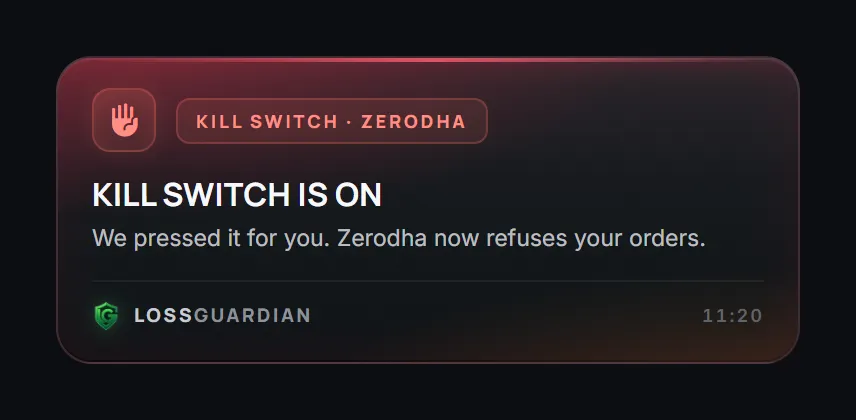
From that point Zerodha refuses new orders in the segments you chose, from every device. Your phone cannot get around it, because the refusal happens at Zerodha.
What about the trade I am still in?
LossGuardian never places, changes or cancels an order, and it never closes a position. That stays your own action in Kite.
Zerodha needs your positions closed before it will switch a segment off. So LossGuardian waits. It presses the Kill Switch once you are out of your trades, not before. Exits are never in its way.
Manual or Automatic: how to choose
Ask one question. On my worst day, will I press it myself?
If yes, Manual keeps the decision with you. If you are not sure, or you already know the answer is no, Automatic keeps the promise you made in the morning. There is a longer comparison in automatic vs manual kill switch.
You can switch between the two outside market hours. During market hours your choice holds, so a bad moment cannot undo a good plan.
What you gain
A day that ends at your number, not at the market's mercy. You do not have to win an argument with yourself at 12:40 PM, because you settled it at 9 AM.
You also get the evening back. A bad day stays a bad day and does not become a bad week.
LossGuardian does not promise results. Nothing can. What it does is keep the rule you chose for yourself. See how the Automatic Kill Switch works for every broker, or what a kill switch in trading is if you are new to the idea. For the full flow from limit to stop, read how to stop trading after a loss automatically.
Set it up
- Connect Zerodha to LossGuardian. It uses Zerodha's official Kite Connect API, and we never see your password.
- Set your daily loss limit in Risk Manager.
- Turn on Advanced Mode, then choose Manual or Automatic for the Zerodha Kill Switch.
More on how it fits with your account is on the Zerodha page.
Try LossGuardian free for 10 days, no card needed. Download it here.
Questions traders ask
What is the Zerodha Kill Switch?
It is Zerodha's own control that stops your account from taking new orders in the segments you switch off. Zerodha calls it the Kill Switch. Once it is on, Zerodha itself refuses your orders, and it lasts until the next session.
How do I turn on the Kite Kill Switch after a loss?
Close your open positions first, because Zerodha refuses otherwise. Then choose the segments to switch off and confirm. You can do it yourself on Zerodha's segment page, or let LossGuardian take you there in one click (Manual) or press it for you with your consent (Automatic).
Is there a Zerodha automatic kill switch?
Zerodha's own Kill Switch is pressed by you. LossGuardian can press it for you when you are done for the day, with your consent. It is optional and off until you choose Automatic.
Can I turn the Zerodha Kill Switch off after I press it?
Not early. Nobody can lift it before the next session.
Will LossGuardian close my open trades or place orders?
No. LossGuardian is read-only. It never places, changes or cancels an order and never closes a position. It waits until you are out of your trades before it presses the Kill Switch.
Can LossGuardian turn on the Zerodha Kill Switch for me?
Yes, if you choose Automatic and agree. Once you are out of your trades, it presses Zerodha's own Kill Switch for the segments you chose. On Manual, it opens the page in one click.
LossGuardian watches your positions across six Indian brokers and warns you the moment you cross your own daily loss limit. It is read-only: it never places, modifies or cancels an order.
Download LossGuardian