
How-to guides
Upstox Kill Switch: where it is, how it works, and the automatic one
Where is the Kill Switch option in Upstox? How it works, what it covers, how long it lasts, and how LossGuardian can press it for you after a loss, with your consent.
Quick answer: Upstox has its own Kill Switch. Once it is on, Upstox refuses orders in the segments you switched off, until the next session, and nobody can lift it early. LossGuardian can take you to it in one step (Manual) or, with your consent, press it for you when you are done for the day (Automatic). On Upstox, Automatic usually needs nothing from you.
You are down for the day. You know it. The plan said stop at this number, and you are past it.
Then comes the thought: one more trade, and I am even. The plan was written in the morning when you were calm. This thought arrives at 1:30 PM when you are not.
If you want to know how to stop trading on Upstox after a loss, this is the tool for it. Here is what it does, and where LossGuardian fits.
What the Upstox Kill Switch does
It is Upstox's own feature, not something LossGuardian built. You pick the segments you want switched off. From then on, Upstox itself refuses orders in those segments.
Two details matter.
You choose the segments. Switching off F&O leaves Equity open. So you can end your options day and still keep a cash position as it is.
It lasts until the next session. Nobody can lift it early. That is the point. A stop you can undo in a weak moment is only a suggestion.
If you want the general idea first, read what a kill switch in trading is.
The trouble with pressing it yourself
The switch only helps if you use it. After a loss, that is the hard part.
Most traders do not skip the switch because they never heard of it. They skip it because the same urge that made the last trade is now talking them out of the stop. You see the loss, you feel the pull, and the page for the switch is one more step away than the order window.
That is the gap LossGuardian works on.
Manual and Automatic on Upstox
LossGuardian is read-only. It never places, changes or cancels an order, and it never closes a position. In both modes the Kill Switch stays Upstox's own. One thing to know: the access Upstox gives LossGuardian is not limited to reading. LossGuardian uses it to read your data and, only if you turn on Automatic and agree, to press Upstox's own Kill Switch for you.
Manual. When you hit a stop, LossGuardian takes you to the Upstox Kill Switch page in one click. You switch it on yourself. Nothing to turn on, nothing to agree to.
Automatic. With your consent, LossGuardian presses the Upstox Kill Switch for you when you are done for the day. It waits until you are out of your trades, so it never closes a position for you.
Automatic is optional. It stays off until you choose it and agree.
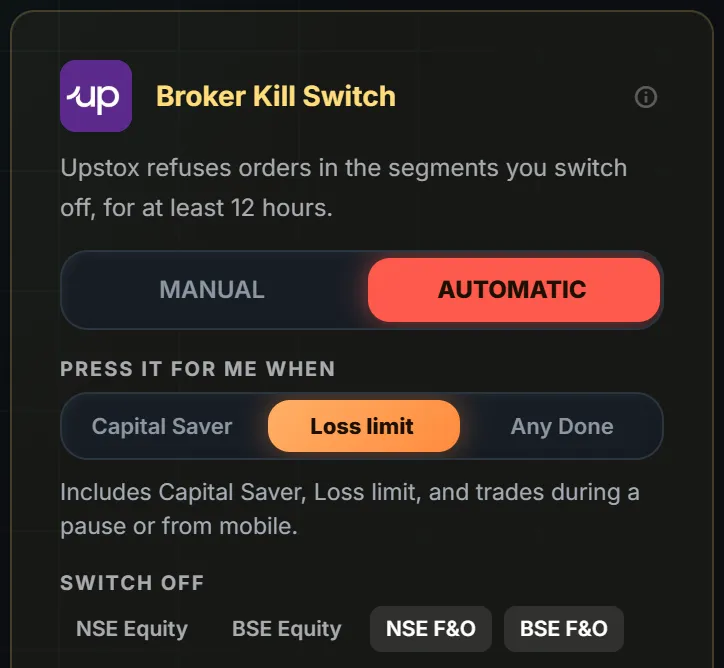
Here is the card in the Risk Manager.
The card shows three things.
- Manual or Automatic. Your choice, per broker.
- Press it for me when. Capital Saver, Loss limit or Any Done. In the picture, Loss limit is selected. The card says that includes Capital Saver, Loss limit, and trades during a pause or from mobile.
- Switch off. The segments: NSE Equity, BSE Equity, NSE F&O and BSE F&O. In the picture, the two F&O segments are selected.
The card also says what Upstox does: it refuses orders in the segments you switch off.
Does Upstox ask for a code?
On Upstox, Automatic usually needs nothing from you. If it cannot finish on its own, Upstox may ask for the code it emails you, and you enter it. That step comes once you are already out of your trades and done for the day.
When the switch is on, you see this.
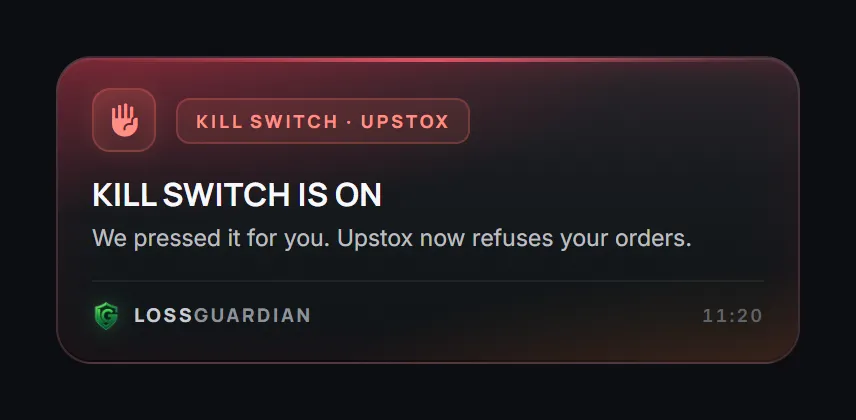
The alert reads "Kill Switch is on". Below it: "We pressed it for you. Upstox now refuses your orders."
Manual or Automatic: which one on Upstox?
Ask yourself one question. After my last big loss, did I stop when I said I would?
If yes, Manual may be all you need. You keep the last word, and the one-click page makes it quick.
If no, Automatic is worth a look. It does not rely on your willpower at the weakest hour. The decision you made in the morning still holds in the afternoon.
You do not have to choose forever. Start with Manual, look at your own record, and move to Automatic if you keep skipping the switch. There is a longer comparison in automatic vs manual kill switch.
Choose your stops with care
Because it lasts until the next session and nobody can lift it early, pick the stops that lead to it with some thought.
- If you are unsure, start with Capital Saver only. That is the narrowest setting.
- Pick the segments you really want to stop. If your trouble is options, F&O may be enough.
- A short pause does not press the Kill Switch.
You can change these settings outside market hours. During market hours your choice holds, so a bad moment cannot undo a good plan.
What you gain
A stop that does not depend on the version of you who just lost money. That is all.
You still make every trade yourself. LossGuardian cannot promise you results, and it does not try to. It helps you end the day when you said you would, and it keeps Upstox's own switch as the thing that does the stopping.
Some traders also like the quiet that comes after. Once Upstox refuses the orders, there is no more arguing with yourself. The day is over.
Where to go next
- The full list of brokers and how long each lasts: Automatic Kill Switch.
- Your Upstox setup: LossGuardian for Upstox and the guide to connect your broker.
- Set the limits that lead to the switch: the Risk Manager guide.
- The bigger picture of ending a day on a loss: how to stop trading after a loss automatically.
You can try LossGuardian free for 10 days, no card needed. Download it here.
Questions traders ask
Does Upstox have a Kill Switch?
Yes. When you switch off a segment, Upstox itself refuses orders in it. You choose the segments, for example F&O. Switching off F&O leaves Equity open.
How long does the Upstox Kill Switch last?
Until the next session. Nobody can lift it early, not you and not LossGuardian. Check Upstox's own help pages for how long it lasts, because that can change.
Can LossGuardian press the Upstox Kill Switch for me?
Yes, if you turn on Automatic and agree. Usually there is nothing for you to type. If it cannot finish on its own, Upstox may ask for the code it emails you.
Will it close my open trades?
No. LossGuardian is read-only. It never places, changes or cancels an order and never closes a position. It waits until you are out of your trades.
Is Automatic on by default?
No. It is optional and stays off until you choose Automatic and agree. You also choose which stops lead to it.
Can LossGuardian turn on the Upstox Kill Switch for me?
Yes. With Automatic on and your consent, it presses the Upstox Kill Switch for you once you are out of your trades. It never closes a position.
LossGuardian watches your positions across six Indian brokers and warns you the moment you cross your own daily loss limit. It is read-only: it never places, modifies or cancels an order.
Download LossGuardian