
How-to guides
Dhan Kill Switch: how the automatic one works and how to stop trading after a loss
How the Dhan Kill Switch for Over-Trading works, what Manual and Automatic mean for a Dhan account, and how to stop trading on Dhan after a loss without relying on willpower.
Quick answer: Dhan has its own Kill Switch, called Kill Switch for Over-Trading. Once it is on, Dhan refuses your orders on the whole account until the next session. LossGuardian can take you to it in one click (Manual), or, with your consent, press it for you when you are done for the day (Automatic). It never touches a trade.
You are down on the day. You know it. You told yourself this morning that you would stop at a certain loss.
Now the Dhan app is open on your phone, and the next trade is two taps away.
This is the real problem with stopping after a loss on Dhan. Dhan gives you stop-losses for single trades. The rule for your whole day lives only in your head, and your head is the one thing you cannot trust at that moment.
What the Dhan Kill Switch is
Dhan has a control of its own for this. It is called Kill Switch for Over-Trading. You find it on Dhan Web, under the Money tab, in Trader's Control.
When it is on, three things are true:
- Dhan refuses new orders on your whole account, every segment at once.
- It does this on every device, including the phone app.
- It stays on until the next session. Nobody can switch it off early. One activation is final.
That last point is what makes it work. A switch you can undo in a weak moment is just another thing to argue with.
Dhan also asks for some housekeeping first. You need to be out of your trades and have no pending orders before it goes on.
This switch belongs to Dhan. LossGuardian does not make it and does not replace it. LossGuardian only helps you use it at the right time. If you want the basics first, read what a kill switch in trading is.
Where LossGuardian fits
LossGuardian connects to your Dhan account and watches your day against the limits you set. It never places, changes or cancels an order, and it never closes a position. That does not change in either mode below. One thing to know: the access Dhan gives LossGuardian is not limited to reading. LossGuardian uses it to read your data and, only if you turn on Automatic and agree, to press Dhan's own Kill Switch for you.
What it adds is a way to use Dhan's own Kill Switch without leaning on your willpower. You choose how.
Manual: you switch it on
On Manual, LossGuardian tells you when you hit a stop and gives you a link to the Kill Switch. You switch it on yourself.
There is one thing to know about Dhan here. Dhan has no direct address for the Kill Switch page. So the link opens Dhan's Money page, and you carry on from there: Trader's Control, then Kill Switch for Over-Trading, then Activate.
Manual keeps the last word with you. It suits you if you already stop when you say you will.
Automatic: LossGuardian presses it for you
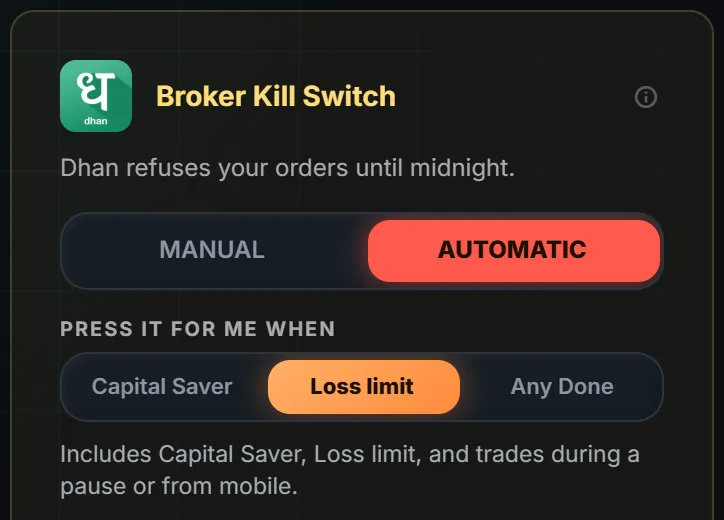
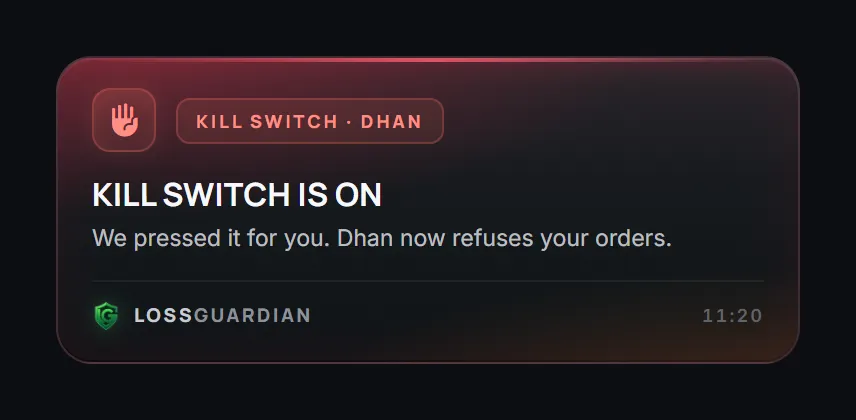
On Automatic, you give your consent once for Dhan. After that, when you are done for the day, LossGuardian presses Dhan's own Kill Switch for you. Dhan then refuses new orders until the next session.
The card above shows the two choices that matter. Number 1 is Manual or Automatic. Number 2 is when it should press: on your Capital Saver only, on your Loss limit, or on any Done. A short pause never presses it.
A few things to keep in mind:
- It is optional. Automatic is off until you turn it on and agree.
- You pick the trigger. Start narrow if you are unsure. Capital Saver only is the gentlest choice.
- It waits for you to be out of your trades. On Dhan, it also waits until you have no pending orders. It does not close or cancel anything on your behalf.
- There is no segment to pick on Dhan. Dhan's switch covers the whole account.
When it is done, you see this.
Manual or Automatic on Dhan
| Manual | Automatic | |
|---|---|---|
| Who switches it on | You, from Dhan's Money page | LossGuardian, for you |
| Your consent | Not needed | Yes, once, and it is optional |
| When | When you choose | When you are done for the day, after you are out of your trades and have no pending orders |
| What Dhan refuses | New orders on the whole account | The same |
| How long | Until the next session | Until the next session |
Ask yourself one plain question. The last time you hit your limit, did you stop?
If you did, Manual is a clean way to close the day. If you did not, Automatic is there for exactly that moment. You can compare the two in more detail in automatic vs manual kill switch: which should you use.
Two things to know before you turn it on
It cannot be undone. Once Dhan's Kill Switch is on, it runs until the next session. That is the point, but it means you should pick your trigger with a calm head. A loss limit you set in the morning is the right time to decide this, not 1:30 PM. If you want help picking the number, read how to set a daily loss limit.
Open trades stay yours. LossGuardian will not square off a position for you. If you are still in a trade when you hit your limit, the Kill Switch waits. You close the trade yourself, and once you have no trades and no pending orders, it can press. Check Dhan's own help pages for how the switch behaves, because broker rules can change.
What you gain
You make the decision once, in the morning, when you are calm. After that, the afternoon does not need you to be strong. Dhan itself says no to the next order, and the bad trade you would have taken never reaches the market.
That is a small thing on paper. It keeps one bad day from turning into a bad week.
LossGuardian cannot promise you results. It cannot make a bad day good. It can only help you stop on time, using the broker's own Kill Switch, with your say-so.
Where to go next
- See how it works for every broker on the Automatic Kill Switch page.
- Read the LossGuardian for Dhan page.
- Connect your account with the connect your broker guide.
- Set your limits and your trigger in the Risk Manager guide.
- Read the longer story in how to stop trading after a loss automatically.
You can try LossGuardian free for 10 days, no card needed. Download it here.
Questions traders ask
What is the Dhan Kill Switch?
Dhan has its own Kill Switch, which it calls Kill Switch for Over-Trading. Once it is on, Dhan itself refuses new orders on your whole account until the next session, from every device. Nobody can switch it off early.
Can LossGuardian press the Dhan Kill Switch for me?
Yes, if you want it to. With your consent, LossGuardian presses Dhan's own Kill Switch for you when you are done for the day. It is optional and stays off until you choose Automatic and agree.
When does the automatic Dhan Kill Switch press?
Only after you are out of your trades and have no pending orders. LossGuardian never closes a position and never cancels an order for you.
What is different about Manual on Dhan?
Dhan has no direct address for the Kill Switch page. On Manual, the link opens Dhan's Money page and you carry on from there.
How do I stop trading on Dhan after a loss?
Set your daily loss limit before the market opens and let something other than willpower enforce it. On Dhan, that can be the broker's own Kill Switch, switched on by you (Manual) or pressed for you with your consent (Automatic).
Does LossGuardian place or close trades on Dhan?
No. LossGuardian is read-only. It never places, changes or cancels an order, and it never closes a position.
Can LossGuardian turn on the Dhan Kill Switch for me?
Yes, if you choose Automatic and agree. It waits until you have no open positions or pending orders, then presses Dhan's own Kill Switch, which covers your whole account until the next session.
LossGuardian watches your positions across six Indian brokers and warns you the moment you cross your own daily loss limit. It is read-only: it never places, modifies or cancels an order.
Download LossGuardian