 LossGuardian
Trading psychology
Why LossGuardian teaches discipline instead of locking you out
Most trading risk tools try to stop you by force. We think that teaches nothing. Here is why LossGuardian works like a companion that builds your habits, so one day you do not need it.
There are two ways to help a trader stop making the same mistake.
The first way is force. Lock them out. Close their positions. Cut off their access when they hit a limit. The mistake stops, at least for today.
The second way is teaching. Show them the mistake clearly, at the moment it happens. Let them choose. Then show them the pattern afterwards, so they understand why it keeps happening.
Most trading risk tools choose force. We chose teaching. Here is why.
Force works for a day
Imagine a tool that closes your trades the moment you hit your loss limit. It sounds perfect. No more blown-up days.
But think about what you learn from it. The tool made the decision. You did not. Tomorrow you trade exactly the same way, because nothing inside you changed. You just got stopped.
And the day you stop using the tool, whether you switch brokers, stop paying or it breaks, you are the same trader you were before. Worse, maybe, because you never practised stopping on your own.
There is a safety side too. A tool that can close your positions has permission to act on your account. That is a lot of trust to hand over.
Teaching lasts
Discipline is a habit. And habits are built one way: by making the right choice, again and again, until it becomes automatic.
That is what LossGuardian is designed for. When you break a rule, it does not take over. It makes sure you see it, clearly, in a way you cannot miss:
- A full-screen alert above your charts, with your real numbers.
- A cooldown timer after a losing streak or a quick re-entry.
- Your own words on screen, if you have written custom messages.
Then you choose. Close the trade. Step away. Wait.
Every time you make that choice, it gets a little easier. After a few weeks you start to feel the limit coming before the alert fires. That is the habit forming. That is discipline that belongs to you.
We wrote more about this decision in why we will never square off your position for you.
The part nobody else does: your own data
Alerts help in the moment. But the real change comes from understanding why you keep making the same mistake.
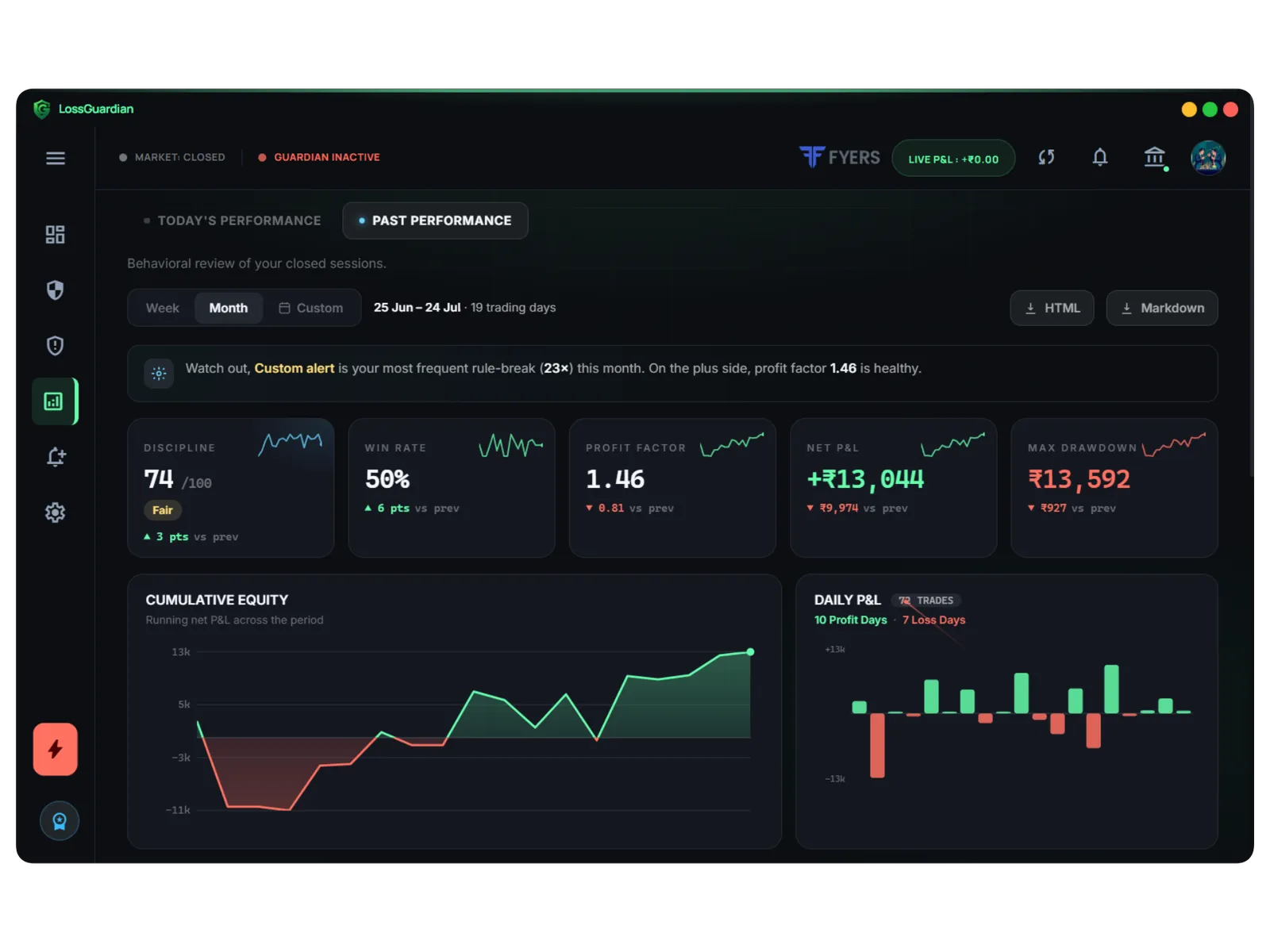
This is where LossGuardian is different from a simple limit tool. It builds a full picture of your trading from your broker data, automatically:
- A discipline score from 0 to 100 for every session, separate from your P&L.
- Which rules you break most: quick re-entries, overtrading, late trades, loss limits.
- Win rate, profit factor and drawdown, compared with the last period.
- A day by day drill-down, with the equity curve and every trade.
When you can see that most of your losses come from trades taken within ten minutes of a stop-out, you do not need anyone to force you. You understand it. And once you understand it, you fix it.
Nobody likes looking at their own mistakes. But your data is the most honest coach you will ever have. We show how to read it in your trading data knows your mistakes.
A companion, not a guard
We like to think of LossGuardian as a trading companion. It sits next to you through the session. It does not grab the mouse. It just makes sure you never lose track of the rules you set when you were calm.
At the end of the week, it sits down with you and goes through the numbers. Here is what went well. Here is the mistake you repeated. Here is what it cost.
Over time, you need it less. You notice the urge to revenge trade before the alert does. You stop at your limit because that is just what you do now. Some traders keep LossGuardian running as a safety net and for the analytics. That is fine. But the discipline itself is yours.
What this means in practice
- LossGuardian is read-only. It never places, changes or cancels an order.
- It never blocks your broker or logs you out.
- You log in on your broker's own page. We never see your password.
- Your data stays on your computer.
- It works with Zerodha, Fyers, Dhan, Upstox, Angel One and Groww, at one price.
The goal is a trader who does not need us
That may sound like a strange goal for a software company. But we believe it is the only honest one.
The traders who become consistently profitable are not the ones with the best tools. They are the ones who built the right habits. We want to help you build them, and then get out of your way.
If you are comparing options, our checklist for choosing overtrading software will help. And if you want to start building the habits today, read how to be a disciplined trader.
Questions traders ask
Does LossGuardian close my trades or block my broker?
No. LossGuardian is read-only. It cannot place, change or cancel an order, and it does not block your broker. It warns you clearly and shows you your data. The decision is always yours.
Why not just have software stop me from trading?
Because being stopped by force does not build a habit. The day the software is gone, you trade the same way as before. Being warned, choosing to stop, and seeing your own pattern is what changes behaviour for good.
What does LossGuardian do when I break a rule?
It shows a clear alert on top of your screen with your real numbers, starts a cooldown timer where it applies, and records the rule break in your discipline score and history.
Will I need LossGuardian forever?
We hope not. The goal is that your rules become habits. Many traders keep it as a safety net and for the analytics, but the discipline itself should become yours.
LossGuardian watches your positions across six Indian brokers and warns you the moment you cross your own daily loss limit. It is read-only: it never places, modifies or cancels an order.
Join the waitlist